
Add new recipients to an existing DemoBoard
When you forgot to include a stakeholder, or when your champion asks you to loop in a colleague, you can add new recipients to a DemoBoard you've already created. This keeps all of the organization's engagement under a single Demolytics record — much cleaner than creating a duplicate DemoBoard for the same company.
Step-by-step
- Open Track DemoBoards (DemoBoards menu).
- Search for the organization or DemoBoard.
- Hover the row, click the link icon in the Actions column. The Edit DemoBoard page opens.
- In the Recipient Information section, click the orange + icon.
- Add the new recipient's email, name, and (optionally) title.
- Scroll down and click Save.
- Copy the DemoBoard link and send it to the new recipient via email or your usual outreach.
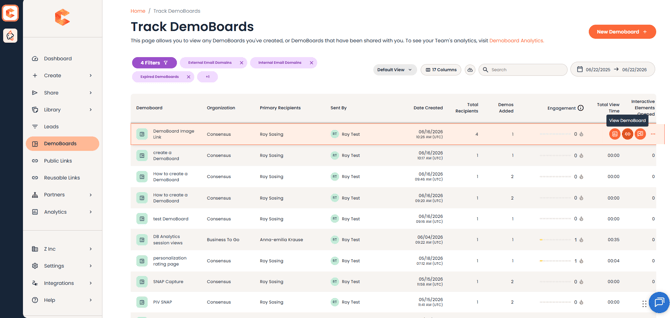
Track DemoBoards — the link icon in the Actions column opens Edit DemoBoard.
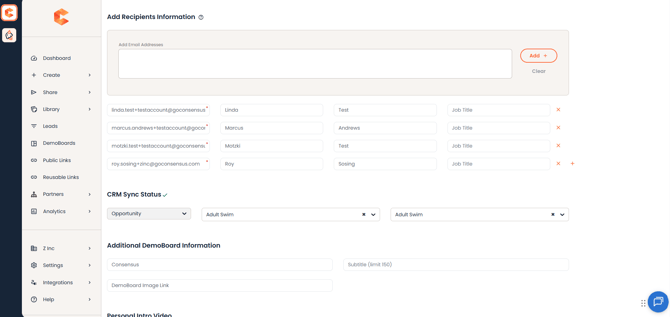
Add Recipients Information, where you can add recipients.
Why is this better than creating a new DemoBoard
- All Demolytics for the organization stay together.
- You can see every stakeholder's engagement in one place.
- No duplicate "DemoBoards for the same org" cluttering your reports.