
Use AI Tag Suggestions to tag demos automatically
AI Tag Suggestions analyzes a demo's content (titles, descriptions, transcripts of videos) and proposes tags from your account's existing tag library. Reduces manual tagging effort and helps surface relevant tags you might have missed.
Where to enable it
Settings → Global Demo Settings → AI Tag Suggestions section.
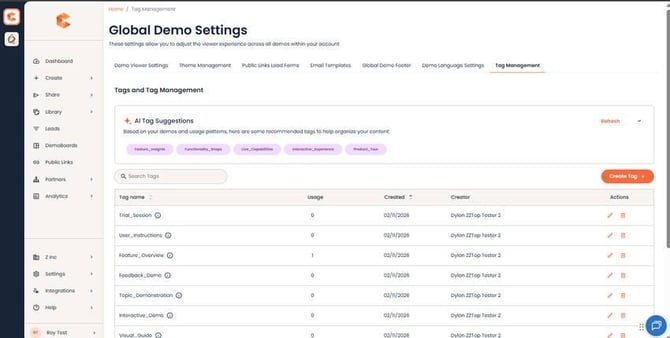
AI Tag Suggestions settings in Global Demo Settings.
How it works
- Enable AI Tag Suggestions in Global Demo Settings.
- When a user opens the Demo Wizard's Step 6 (Finalize), the Demo Tags section displays AI-suggested tags pulled from your existing Tag Management list, ranked by relevance to the demo content.
- The user picks which suggestions to apply, edits / removes any, and saves the demo.
What it does NOT do
- Does not create new tags. Suggestions are limited to tags already in Tag Management.
- Does not auto-apply tags without user confirmation. The user always reviews and accepts.
- Does not modify tags on already-published demos retroactively.
Permissions
AI Tag Suggestions surface for any user with Tag Assignment permission. By default that's Admin, Content Manager, Content Creator, and Reseller Content Manager. See "Tagging - Tag Admin and Tag Assignment" for the full permissions model.