
The Consensus Platform API uses the OAuth 2.0 Authorization Code flow with PKCE for application authentication. The interactive API docs let you generate a short-lived bearer token to test endpoints in the browser, but any application that accesses the API on behalf of a user must implement OAuth. This guide takes you from zero to a continuously running integration.
Prefer to talk it through? Ask the interactive guide below anything about Consensus API authentication — or read on for the full reference.
| Overview: What This Guide Covers |
You’ll set up credentials, implement the full flow, and keep it running:
-
Creating OAuth client credentials in the Consensus web app (or via API)
-
Implementing Authorization Code + PKCE flow
-
Refreshing tokens so your app runs continuously ·
-
Revoking and introspecting tokens
-
Troubleshooting common errors · and the
-
Headless (server-to-server) grant for unattended jobs.
Base URLs: all examples use https://app.goconsensus.com; the OAuth endpoints live under /api/auth/v1.0/oauth2. |
What you’ll need:
-
A Consensus account with access to Integrations settings,
-
A registered Callback URL for your application,
-
And your
client_idandclient_secret(generated in Step 1).
| Step 1: Create Access Credentials |
Register your application to obtain a client_id and client_secret:
1.1 From the Consensus web app, navigate to Integrations and select the Access Credentials tile.
1.2 Click Add New Credentials in the top-right corner.
1.3 Configure your application:
-
Credentials set name (a label for this set, e.g., your app’s name)
-
Callback URL (the exact URL Consensus redirects to after authorization — it must match your
redirect_uriexactly: no trailing slashes, no wildcards) -
Scopes your application needs:
public:api:read(read access to public API endpoints),read:read(read scope for resources),read:write(write scope for resources).
1.4 Once saved, click the eye icon next to Client secret to reveal and copy it.
|
Warning: Store your client secret securely — it is shown only once. Copy it into a password manager or secrets vault immediately; the server stores a bcrypt hash and cannot reveal the plaintext again. If you see a value starting with |
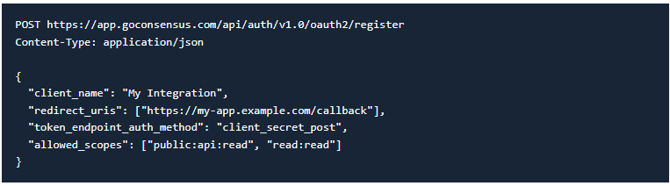
Alternative — register a client via API (RFC 7591 Dynamic Client Registration): if you need to create credentials programmatically, use the registration endpoint. The same one-time rule applies — save the secret immediately.
| Step 2: Authorize the User |
The flow begins by sending the user to the Consensus authorization endpoint. PKCE is mandatory — only the S256 challenge method is supported.
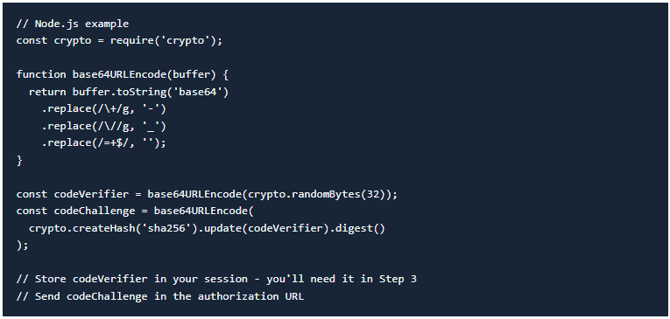
2.1 — Generate PKCE values. The code_verifier is a cryptographically random string; the code_challenge is its SHA-256 hash, base64url-encoded:
|
Warning: Keep the |
2.2 — Redirect the user to the authorize endpoint.
Endpoint: GET
https://app.goconsensus.com/api/auth/v1.0/oauth2/authorize
| Parameter | Required | Description |
response_type |
Yes | Must be "code" |
client_id |
Yes | Your client ID from Step 1 |
redirect_uri |
Yes | Must match the callback URL registered for your credentials exactly |
scope |
Yes | Space-separated list (e.g., "public:api:read read:read") |
state |
Yes | A random string to prevent CSRF attacks. Verify it on callback. |
code_challenge |
Yes | The PKCE challenge generated in 2.1 |
code_challenge_method |
Yes | Must be "S256" |
Example URL:
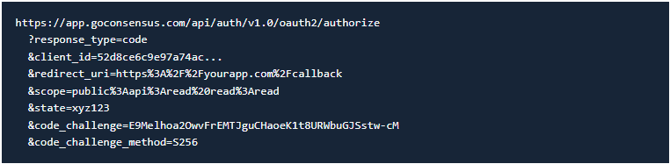
2.3 — Handle the callback. After the user grants consent, Consensus redirects to your redirect_uri with code and state query parameters. Always validate that state matches the value you sent in Step 2.2— if it doesn’t, abort the flow; this protects against CSRF attacks.
|
Warning: Authorization codes are single-use and expire after 10 minutes. Exchange them for tokens immediately. Don’t attempt to reuse a code — even a failed exchange attempt consumes it. |
| Step 3: Exchange the Code for Tokens |
Endpoint: POST https://app.goconsensus.com/api/auth/v1.0/oauth2/token
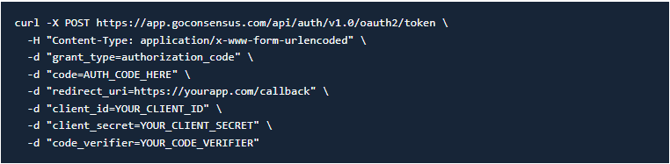
Send a POST request with Content-Type: application/x-www-form-urlencodedand the following body parameters:
| Parameter | Description |
grant_type |
Must be "authorization_code" |
code |
The authorization code from Step 2.3 |
redirect_uri |
Must match the redirect_uri from Step 2.2 |
client_id |
Your client ID |
client_secret |
Your client secret |
code_verifier |
The PKCE verifier you generated in Step 2.1 |
Example request:
Example response:
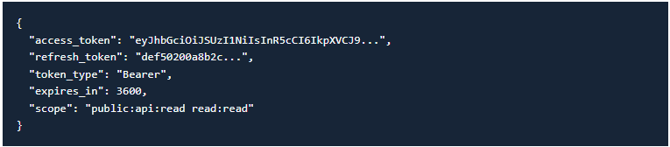
The access token is a JWT signed with RS256. Store both tokens securely on your server — never in the browser or client-side code. Access tokens expire after 1 hour; refresh tokens after 30 days.
| Step 4: Call the Consensus API |
Include the access token as a Bearer token in the Authorization header on every request:

|
Warning: Do not send the |
| Step 5: Refresh Access Tokens |
Access tokens expire after one hour. Use the refresh token to get a new one without prompting the user to re-authorize — same endpoint.
Endpoint: POST
https://app.goconsensus.com/api/auth/v1.0/oauth2/token
| Parameter | Description |
grant_type |
Must be "refresh_token" |
refresh_token |
The refresh token from Step 3 |
client_id |
Your client ID |
client_secret |
Your client secret |
Example request:

Refresh token rotation: each refresh may return a new refresh token along with the new access token — always replace your stored refresh token with the latest value returned.
Recommended pattern: refresh proactively when the token is within 5 minutes of expiry, or handle 401 responses by refreshing and retrying once.
| Headless OAuth: Server-to-Server Flow |
The Headless OAuth grant (also called the API Credentials grant) is for unattended server-to-server integrations — cron jobs, scheduled syncs, iPaaS connectors — that can’t complete a browser consent step. Instead of redirecting a user, you supply your OAuth client credentials plus your organization’s Integrations API key/secret to mint a token on behalf of a named user. The token represents that specific user (not a shared service account), so the user must already exist in your Consensus organization.
Use this flow when:
-
You need a server-to-server connection with no human login step;
-
You have a registered confidential OAuth client;
-
your org has Integrations → API Credentials (
api_key/api_secret— visible to Org Admins only) -
You want to act as a specific, existing Consensus user.
For interactive applications where users sign in themselves, use the Authorization Code + PKCE flow (Steps 2–5).
Prerequisites:
-
A confidential OAuth client with client_id and client_secret (see Step 1 of the API registration section above). Public clients are not supported — the request will return unauthorized_client.
- Organization Integrations API credentials: api_key and api_secret. These are found in
Consensus under Integrations → API Credentials. Only Org Admins can view them. - The email address of an existing, active Consensus user in your organization (or a child
group of your org). The user is not auto-provisioned.
Request:
Endpoint: POST https://app.goconsensus.com/api/auth/v1.0/oauth2/token
with application/x-www-form-urlencoded (JSON body is not accepted). No code, PKCE, redirect_uri, or state — this is a direct token request.
| Parameter | Required | Description |
grant_type |
Yes | client_credentials or api_credentials (equivalent) |
client_id |
Yes | Your OAuth client ID |
client_secret |
Yes | Your OAuth client secret (plaintext, not the bcrypt hash) |
api_key |
Yes | Organization Integrations API key |
api_secret |
Yes | Organization Integrations API secret |
user_email |
Yes | Email of the Consensus user to act as (must exist and be active) |
scope |
No | Space-separated scopes; omit or leave blank for empty scope |
Example request (curl):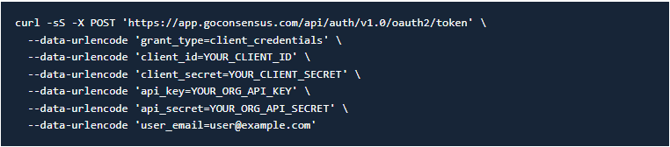
A successful request returns HTTP 200 with the same token shape as the Authorization Code grant:
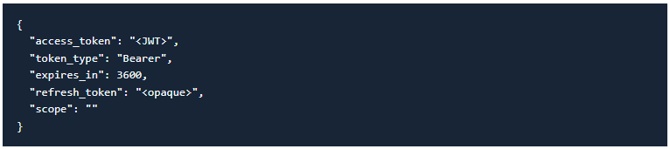
The access token is a JWT (RS256), with lifetimes per your client configuration (defaults: 3600 seconds for access tokens, 30 days for refresh tokens).
Refresh token best practice: each successful headless request issues a new refresh token, so a job that calls the headless grant on every run accumulates refresh rows (each valid 30 days). Store the refresh token after the first call, then use grant_type=refresh_token for subsequent runs until it expires — only call the headless grant again when it does. The refresh call re-verifies only the refresh token and OAuth client credentials, not api_key/api_secret.

Headless grant error reference (RFC 6749 codes; some flow-specific):
| HTTP / error | Meaning |
400 invalid_request |
Missing or malformed fields (including invalid email format) |
400 invalid_client |
Unknown client_id or wrong client_secret |
400 unauthorized_client |
Public/non-confidential client used — headless requires a confidential client |
400 invalid_scope |
Requested scope not on the client allow-list |
400 unsupported_grant_type |
Unsupported grant type (e.g., password) |
401 invalid_grant |
User found, but Integrations api_key/api_secret don’t match (wrong secret or wrong org) |
404 invalid_grant |
No usable user — unknown email, inactive or locked account (Consensus-specific) |
| 503 / 500 | temporarily_unavailable (upstream service down) / server_error (token mint failed) |
|
Warning: The 401 and 404 cases both return |
Security considerations: treat your org Integrations credentials with the same care as your OAuth client secret — if compromised, someone can mint tokens for any active user in your organization.
-
Restrict
api_key/api_secretto Org Admins, -
Rotate Integrations credentials in the Consensus UI if a breach is suspected,
-
Revoke issued tokens via the
/revokeendpoint, -
Keep all credentials server-side only — never in client-side code or version control.
| Revoking Tokens |
Use the revoke endpoint when a user disconnects your app or you need to invalidate a token.
Endpoint: POST https://app.goconsensus.com/api/auth/v1.0/oauth2/revoke

Set token_type_hint to access_token or refresh_token; revoking a refresh token also invalidates any access tokens issued from it.
| Inspecting a Token |
Check whether a token is still active with the introspection endpoint.
Endpoint: Post https://app.goconsensus.com/api/auth/v1.0/oauth2/introspect

| Troubleshooting |
| Error | HTTP | Meaning | Fix |
invalid_client |
401 | Wrong client_id or client_secret. A credentials problem — not PKCE. |
Copy both values fresh from Consensus. If you see $2y$... in the UI, that’s the stored hash — create new credentials. Note: a successful authorization redirect (Steps 1–2) only validates client_id, not client_secret. |
invalid_grant |
400 | PKCE verifier mismatch, code already used, or code expired (10-min TTL). | Use the code_verifier from the exact same run that generated the auth URL. Codes expire in 10 minutes and are single-use — even a failed exchange consumes the code. |
invalid_request |
400 | redirect_uri doesn’t match exactly. |
Compare character-for-character with the Callback URL in Consensus. Trailing slashes, http vs https, and www vs non-www all matter. |
unauthorized_client |
400 | Client not allowed to request the specified scope(s). | Check the scopes configured on the credential set in Consensus. |
| FAQ |
Which flow should I use? Interactive app where users sign in themselves → Authorization Code + PKCE (Steps 1–5). Unattended server job with no human login → the Headless grant.
I lost my client secret — can support recover it? No. Only a bcrypt hash is stored, so the plaintext can’t be retrieved by anyone. Create a new credential set and update your integration.
My token exchange fails but the authorization redirect worked. Why? The redirect only validates your client_id — a wrong client_secret surfaces for the first time at the token endpoint. See invalid_client in Troubleshooting.
How long do tokens last? Access tokens: 1 hour. Refresh tokens: 30 days. Authorization codes: 10 minutes, single-use.
It works in the API docs “Try it” but not in my app. Two usual causes: the docs portal uses its own short-lived token, and it injects a platform: developer-platform header that your integration must not send.
| Endpoint Reference |
| Method | Endpoint | Purpose |
| GET | /api/auth/v1.0/oauth2/authorize |
Start the authorization flow |
| POST | /api/auth/v1.0/oauth2/token |
Exchange auth code for tokens, refresh tokens, or headless grant |
| POST | /api/auth/v1.0/oauth2/revoke |
Revoke an access or refresh token |
| POST | /api/auth/v1.0/oauth2/introspect |
Check the status of a token |
| GET | /api/auth/v1.0/oauth2/userinfo |
Get info about the authenticated user |
| POST | /api/auth/v1.0/oauth2/register |
Register a new OAuth client (RFC 7591) |
| GET | /api/auth/v1.0/oauth2/jwks.json |
Public keys for token verification |
| GET | /.well-known/oauth-authorization-server |
Server metadata (RFC 8414) |
All paths are relative to https://app.goconsensus.com.