
Note: This is not live. We are aiming to release it on Nov 12
Table:
-
Overview
-
Before You Begin (Requirements)
-
Connection Process
-
Sync Settings
-
How it Works
-
Migrating from HubSpot Data Sync (If you're previously connected)
-
FAQs
Overview
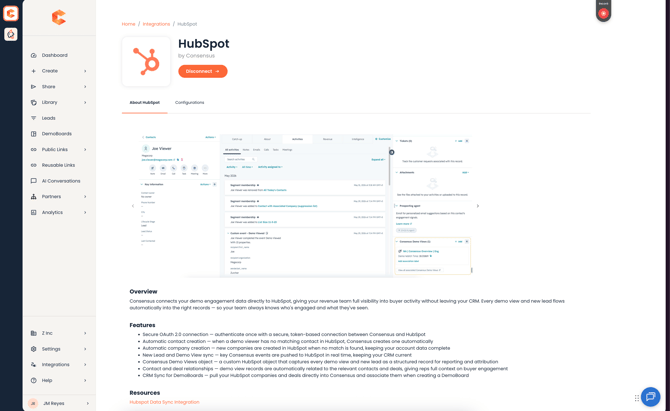
The Consensus HubSpot integration brings your demo engagement data into the CRM your team already works in. Marketing views and sales views sync to HubSpot as records on a custom object, and each one is automatically associated to the right Contact, Company and Deal
Sales, Marketing and RevOps teams can use this data to qualify leads sooner, trigger campaigns, give reps context before a follow up, and report on how demos influence pipeline and revenue
This integration connects through a secure OAuth 2.0 sign in, so there is no private app token to create or manage. It also adds new controls over what gets synced and new attribution logic that ties each view to the right Company and Deal
What's new compared to the Hubspot Data Sync Integration
- Secure and streamlined OAuth 2.0 authentication
- Improved attribution that looks up the primary Company of the Contact
- Views are attributed to the Company and/or Deal selected when the DemoBoard was created
- Domain filtering rules
- Control over whether new Contacts and Companies are created when no match is found
- CRM Sync, which lets you pick a Company or Deal when creating a DemoBoard
Before You Begin
- You need Admin permissions in Consensus to see the HubSpot tile and connect the integration
- You need a HubSpot user who can authorize the connection
- Core sync (New Lead events, Demo View events and CRM Sync) works across HubSpot tiers
- The Custom Object used for deeper reporting is only available on HubSpot Enterprise tiers
Connection Process
Step 1: In the Consensus web app, go to Integrations and locate the HubSpot tile
Step 2: Select Connect and sign in to HubSpot to authorize Consensus. You only need to do this once to establish the connection
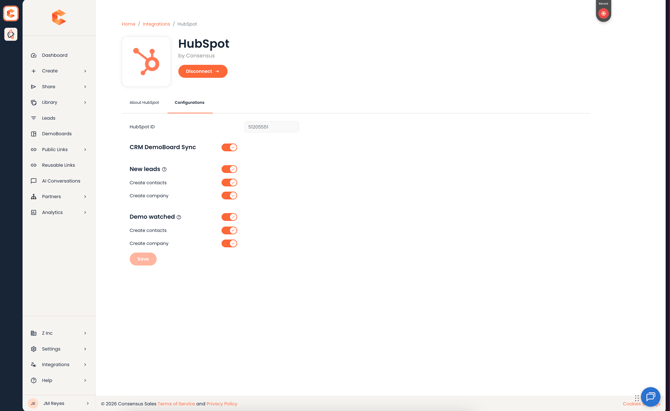
Step 3: Configure your sync settings
Congratulations, you have successfully connected HubSpot and Consensus
Sync Settings
Once connected, you can turn each of these on or off at any time
- New Lead events syncs qualified leads from your public demo links (marketing views)
- Demo View events syncs views of your personalized DemoBoards (sales views)
- Automatic creation of Contacts and Companies creates a new record when no match is found in HubSpot. You can control Contact creation and Company creation separately
- CRM Sync lets users select HubSpot Companies and Deals when creating a DemoBoard
Domain filtering rules
You can add domain filtering rules to control which email domains are allowed to create or match records in HubSpot
How it Works
Marketing Demo Views
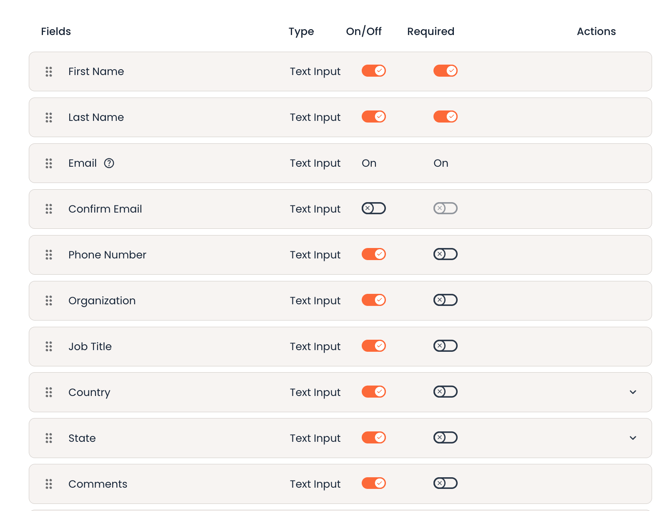
A Qualified Lead in Consensus is generated when a prospect converts through a public demo link, which means they filled out and submitted the lead gate form
The New Lead event triggers off of this conversion and sends the data to HubSpot
When a new lead is created from a Consensus lead form, data sync now supports all standard fields in the form except Comment
Sales Demo Views
A sales demo view is a view of a personalized DemoBoard. DemoBoards are usually sent to a known recipient and can then be shared within their organization. Because Consensus often discovers new stakeholders inside the account, these viewers can be added as new Contacts in HubSpot as well
The Demo View event triggers off of every DemoBoard view and sends the data to HubSpot as a custom object record
Custom Demo Views Object
IMPORTANT NOTE: Please DO NOT create the custom object yourself. The integration creates it for you
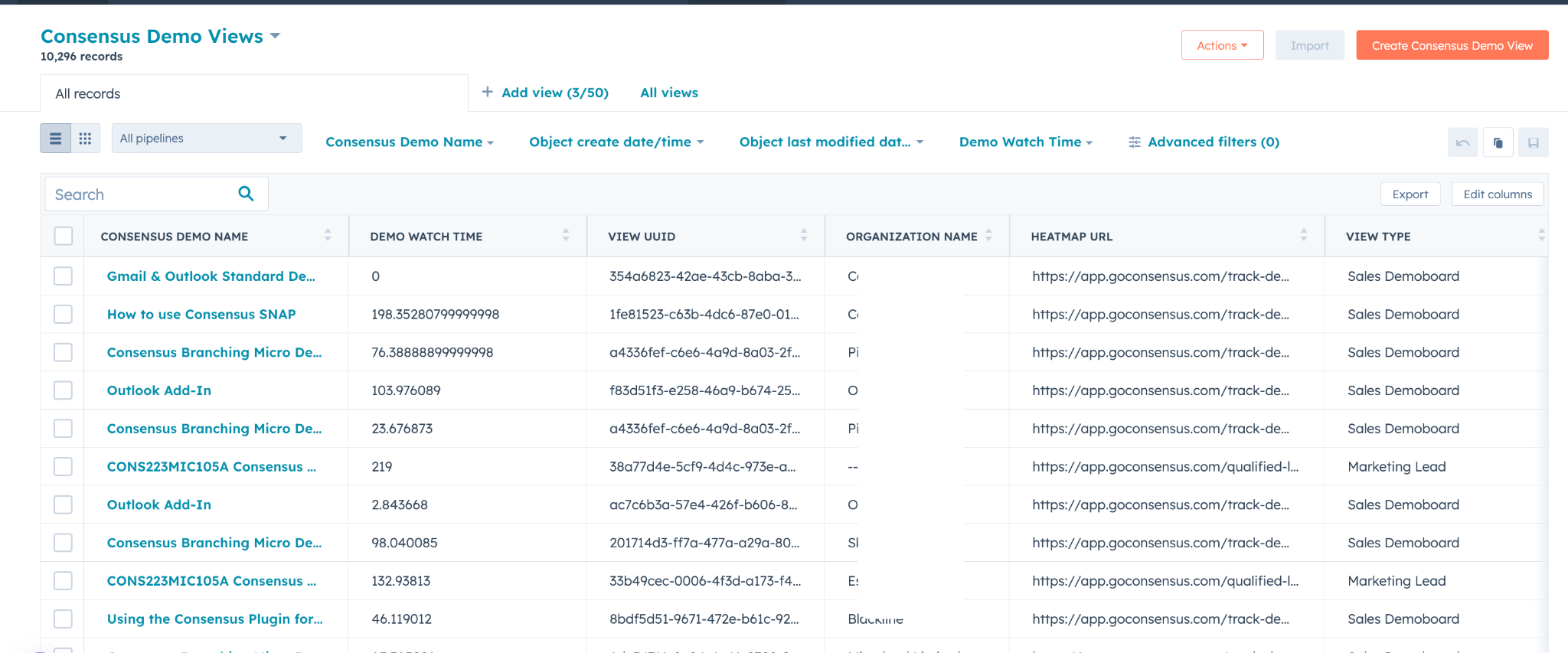
Every view is logged as a record on the Consensus Demo Views custom object. If you already use the Hubspot Data Sync Integration, this is the same object, so your existing history stays in place and new views continue to land alongside it
- Created by User ID
- Demo Title
- Demo Watch Time
- DemoBoard Owner Name
- View Date
- View Type (either "Sales DemoBoard" or "Marketing Lead")
- View UUID (unique view ID)
- Viewer First Name
- Viewer Last Name
- Country
- State
- Heatmap URL
- UTM Campaign
- UTM Content
- UTM Medium
- UTM Source
- UTM Term
- Very Important Feature
- Somewhat Important Feature
- Not Important Feature
Data Flow
When a New Lead or Demo View event comes in, the integration performs the following actions
- Looks up Contacts by email address
- Creates a new Contact if no match is found and creation is enabled
- Looks up the primary Company of the Contact
- Creates a new Company if no match is found and creation is enabled
- Looks up open Deals
- Creates a Demo View record on the custom object
- Associates the Demo View record to the Contact, Company and Deal
Existing records are not overwritten. If a matching Contact or Company already exists, the integration updates the record without replacing values that are already there
Automatic Record Association
Your reps don't need to attach DemoBoards to records by hand. Each view is associated automatically in this order
Demo View → Contact → Company → Deal
Reps see demo activity directly on the Contact, Company and Deal records where they already work
Attribution Logic
The native integration attributes each view in two ways
- Selected at creation: if a Company and/or Deal was selected when the DemoBoard was created, the view is attributed to that Company and/or Deal when it syncs
- Looked up on sync: if nothing was selected, the integration finds the primary Company of the Contact and associates the view to it
CRM Sync: Select a Company or Deal When Creating a DemoBoard
When CRM Sync is enabled, the DemoBoard creation flow shows a list of HubSpot Companies and Deals that you own. Choose one so engagement is tied to the right record from the start
- The list only includes records owned by the current user
- Recipients are added automatically based on the Deal you select
- When a view comes in, it is associated to the correct record
UTM Parameters (Public Links only)
The custom object includes fields for the common UTM parameters used with public link URLs
- UTM Term
- UTM Source
- UTM Campaign
- UTM Medium
- UTM Content
When you redirect users to a public link or embed one on your website, append these parameters to the link and they will pass through to the custom object record when a qualified lead is created
Sample Formatting:
https://play.goconsensus.com/9032ds023d?utm_campaign=email%20blast&utm_term=search&utm_medium=paid%20ad&utm_source=google&utm_content=demo
Test the Integration Before You Migrate
If you already use the Hubspot Data Sync Integration, you can test the native integration without risking production data
Step 1: Create a sandbox environment in your HubSpot account
Step 2: Connect the native HubSpot integration to the sandbox
Step 3: Leave your current integration connected to production
This lets you compare both integrations side by side while your production data stays untouched
Migrating from the Hubspot Data Sync Integration
The native integration is the HubSpot integration Consensus will support going forward. The Hubspot Data Sync Integration is planned for deprecation in April 2027 at the latest, so we recommend testing now and planning your migration early
You do not need to migrate any historical engagement data. Views sync to the same custom object
Frequently Asked Questions
Will this overwrite existing data if a matching Contact is found?
No. If a matching Contact already exists, the integration does not overwrite existing values
Do I need to migrate historical engagement data from the old integration?
No. Data syncs to the same custom object
Do I need a specific HubSpot tier?
Core sync (New Lead events, Demo View events and CRM Sync) works across tiers. The Custom Object option for deeper reporting is only available on HubSpot Enterprise tiers
What happens if there is no matching Contact or Company?
If automatic creation is enabled, a new Contact and/or Company is created from the available data
How can I test the integration before migrating?
See the section above on testing with a HubSpot sandbox
Does my account need HubSpot Enterprise?
No. You can still use Contact and lead creation, demo attribution and CRM Sync on lower tiers
Known Limitations
- Custom Object support, which enables richer reporting, is limited to HubSpot Enterprise tier accounts