
Choose a thumbnail for your demo
A demo thumbnail is the image that represents your demo across the Consensus platform — in the Demo Library, in DemoBoard image links, and as the default thumbnail when reps share the demo through outreach. You can pick a thumbnail while creating the demo, or change it later from the Demo Library.
Two ways to set a thumbnail
1. Pick from auto-generated options
Consensus automatically generates 8 candidate thumbnails from frames of your demo videos. Pick the one that looks best — usually a moment with a clean UI, recognizable feature, or a well-composed shot
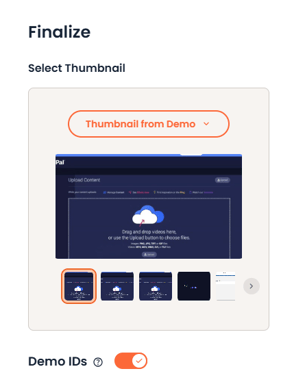 Thumbnail Picker
2. Upload your own image
If none of the auto-generated options work — or you want a custom illustrated or branded thumbnail — upload an image file from your device. Common use cases: campaign-specific thumbnails, branded title cards, marketing-team-designed graphics.
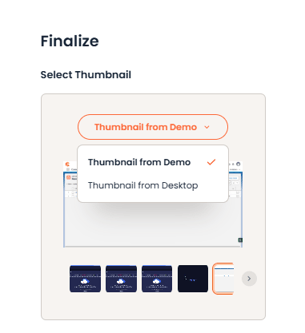 Thumbnail selector - from Demo or Desktop
When to set a thumbnail
During demo creation
On Step 6 (Finalize) of the Demo Wizard, the thumbnail picker appears alongside Demo IDs. Choose your thumbnail there before you publish.
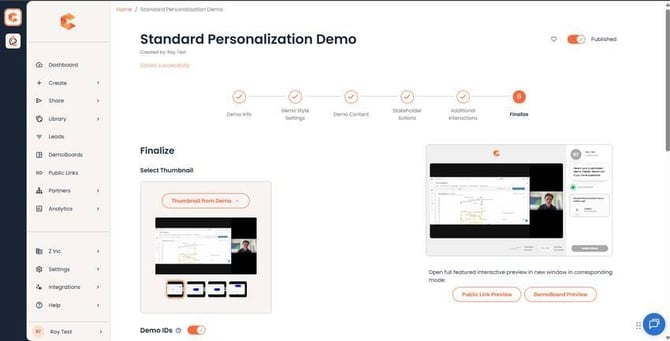 Step 6 of the Demo Wizard — the thumbnail picker is in the upper section alongside Demo IDs.
After demo creation
Open the Demo Library, select the demo, and edit its thumbnail from the demo's detail panel. Useful when you want to refresh thumbnails for an existing demo — for example, when a campaign changes or the demo content has been updated.
How thumbnails are used
Once you've set a thumbnail, it's used in three places:
- Demo Library — anyone with access to the Library sees this thumbnail when browsing.
- DemoBoard image links — when a rep creates a DemoBoard from this demo and chooses Image Link as the CTA, the demo's thumbnail is the default image.
-
Per-DemoBoard override — DemoBoard creators can still customize the thumbnail for their specific DemoBoard image link if they want something different from the demo's default.