
DemoBoard Expiration
Consensus offers two complementary expiration features. Manual expiration lets a user expire (or re-activate) any specific DemoBoard on demand. DemoBoard Expiration by Days is an account-level default that applies a standard expiration window to every new DemoBoard. Both can be used together.
Manually expire or activate a DemoBoard
Use this when you need to lock a specific DemoBoard immediately — a deal closes, a contract ends, a prospect asks for their data to be cut off.
- Open Track DemoBoards (DemoBoards menu in the sidebar).
- Find the DemoBoard. Click the three-dots More Actions icon in the Actions column.
- Choose Expire (or Activate, for an already-expired DemoBoard).
- Confirm. The DemoBoard's row now shows the hourglass icon for expired, or returns to its normal state when re-activated.
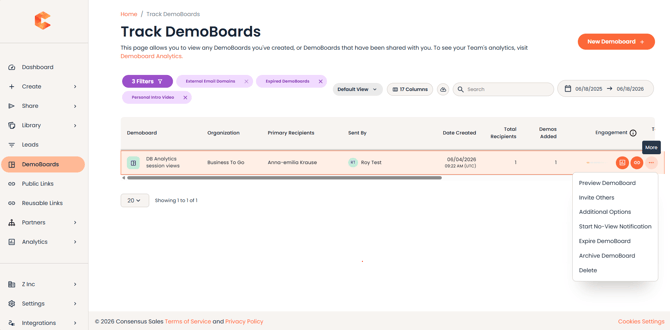 Track DemoBoards — three-dots More Actions menu with Expire / Activate options.
Once expired, viewers who try to open the DemoBoard URL see a "Demo has expired" message. Re-activating restores access immediately.
DemoBoard Expiration by Days (account-level default)
Set a default expiration window so every new DemoBoard automatically expires after N days. Useful when you want a uniform "freshness window" across the team — for example, demos auto-expire after 90 days so reps can't lazily reuse stale links.
Configure the default
- Click Settings (gear) → Global Demo Settings.
- In the General Settings section, find DemoBoard Expiration by Days (Default).
- Toggle ON and set the number of days.
- Click Save.
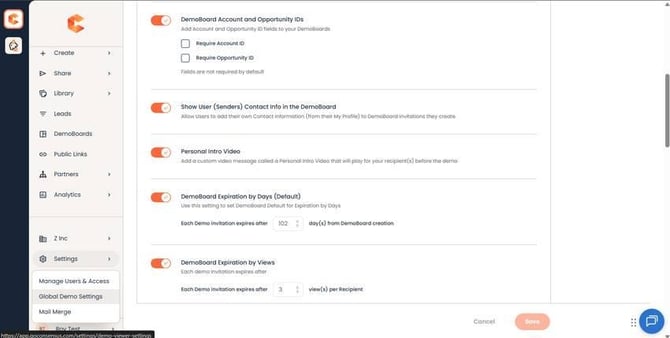 General Settings — DemoBoard Expiration by Days (Default) toggle and days input.
Override per DemoBoard
Even with the account default ON, individual users can adjust the expiration date when creating a DemoBoard. From the Create DemoBoard page, expand Additional Options and set the Expiration date directly.
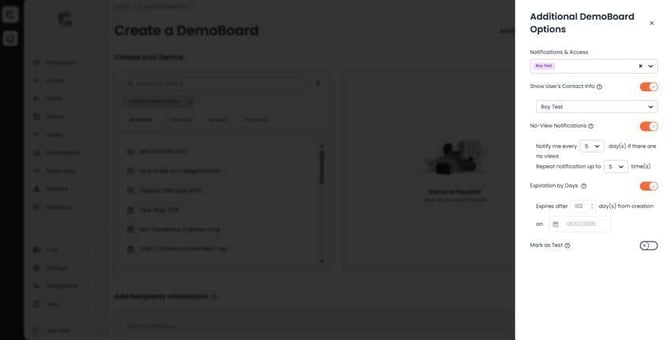 Create DemoBoard → Additional Options — per-DemoBoard Expiration control overrides the account default.
Pro-tip
If you'd rather give reps full control without an account-wide default, leave DemoBoard Expiration by Days OFF — they can still set per-DemoBoard expirations on the cases that need them.
Expiration in the integrations
DemoBoard expiration also flows through the SNAP, Outlook, and Outreach integrations. In SNAP specifically, expired DemoBoards display with an "offline" icon under the Track tab and can be reactivated from there.