
Control what viewers see about each other
Every DemoBoard opens with a "Who Are You?" page that shows the list of recipients invited to that DemoBoard. By default, this drives social pressure — viewers see other names on the list and are more likely to engage. But you can dial back what's shown depending on how much privacy your buyers expect. You can also decide whether new viewers (people not on the original recipient list) can register themselves to view the DemoBoard.
Both controls live in Global Demo Settings and apply account-wide — to every DemoBoard, including ones already created.
Where to find the settings
Click Settings in the bottom-left sidebar to expand its sub-menu, then choose Global Demo Settings. The relevant toggles are on the Demo Viewer Settings tab (the default tab) under the Privacy & Security section.
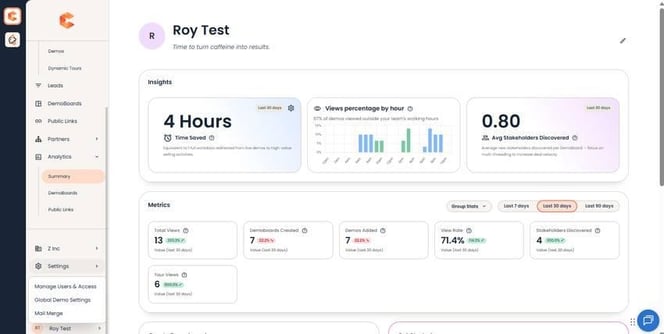
Settings menu — Global Demo Settings is the second sub-item.
Increase Viewer Privacy
The Increase Viewer Privacy toggle is in the Privacy & Security section of Global Demo Settings. By default it's ON, set to Low. Three states:
- Off — Names and emails of every recipient are shown on the Who Are You page.
- Low — Names are shown but email addresses are hidden. Optional sub-checkbox Secure Viewer Name Display further hides each recipient's last name (shows first name + first initial only).
- High — All recipient information is hidden. Viewers must enter the email address they were invited under to access the demo. If their email matches a recipient on the list, access is granted; otherwise, denied.
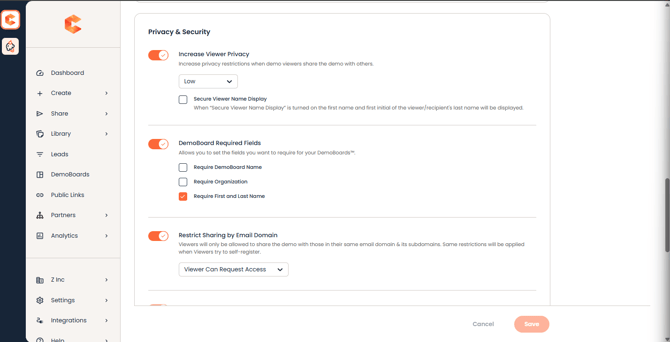
Privacy & Security (top) — Increase Viewer Privacy with the Low/High dropdown and the Secure Viewer Name Display sub-checkbox.
When to use each level
- Low — typical for most B2B SaaS sales motions where buyers expect to see who else is engaged.
- Low + Secure Name Display — when you have customers in regulated industries (healthcare, finance) who expect more privacy.
- High — sensitive demos: pre-release products, NDA-only content, or strict-privacy enterprise sales cycles where the recipient list itself is confidential.
The "I'm New Here" button
Independently of the privacy level, you can decide whether the Who Are You page shows an "I'm New Here" button. When it's on, anyone with the DemoBoard URL can register themselves as a new viewer and access the demo. When it's off, only people on the recipient list can get in.
The toggle for this is in the Sharing section of Demo Viewer Settings — "Enable access to new viewers through the 'I'm New Here' option."
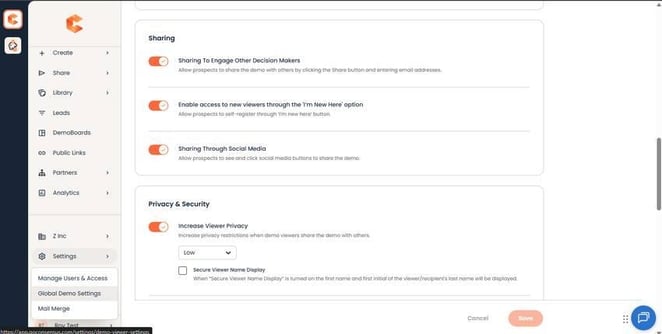 Sharing section — "Enable access to new viewers through the 'I'm New Here' option" toggle.
I'm New Here with each privacy level
You can mix and match: any privacy level (Off / Low / High) can be paired with I'm New Here on or off. Combinations:
- Privacy Off + I'm New Here On — most open setup, anyone can join the DemoBoard and everyone sees everyone else.
- Privacy Low + I'm New Here On — typical default for B2B sales.
- Privacy High + I'm New Here Off — most locked down, only invited recipients (matched by email) can access; no one else can register.
Important note about scope
Both settings are account-level. The privacy level and I'm New Here state you pick apply to every DemoBoard in your account — including DemoBoards created before you changed the setting. There's no per-DemoBoard override; if you need one DemoBoard locked down differently from the rest, talk to your CSM about whether a separate account or workspace makes sense.