
Change your date format
Date format (MM/DD/YYYY vs. DD/MM/YYYY vs. YYYY-MM-DD) is a per-user setting in your My Profile. Each user picks their own format — what you see in Track DemoBoards, Demolytics, and email summaries follows your own preference, regardless of where your account is located.
Step-by-step
- Click your name and avatar in the bottom-left corner of the sidebar.
- Choose My Profile from the menu.
- Click Update at the bottom of the Personal Information page to switch to edit mode.
- Find the Date Format dropdown in the Display Preferences section.
- Pick your preferred format (MM/DD/YYYY, DD/MM/YYYY, YYYY-MM-DD, etc.).
- Click Update at the bottom of the page to save.
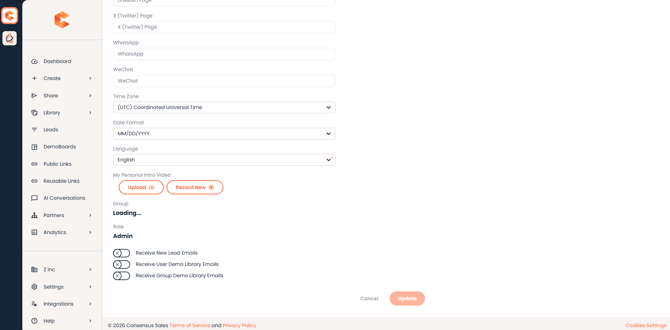
My Profile — Date Format dropdown in the Display Preferences section.
What changes
Once you save, every date you see in Consensus uses the new format: DemoBoard creation dates, view timestamps, expiration dates, email notifications. The change is immediate — no need to refresh.