
Embed a demo directly on your website
Embedding a Consensus demo via iframe puts the DemoPlayer right inside your own page — viewers can watch without ever leaving your site. Common use cases: product pages, lead-gen landing pages, and feature-deep-dive blog posts. Embedding works with any Public Link.
Step-by-step
- In the sidebar, click Public Links → Create Public Link.
- Pick the demo from the Search / dropdown.
- Name the Public Link (so you can find it later in Track Public Links).
- Under Choose a Location, select Website.
- Click Create Public Link.
- On the resulting page, click Copy Embed Code for the full-screen version, or Copy Link if you want the bare URL.
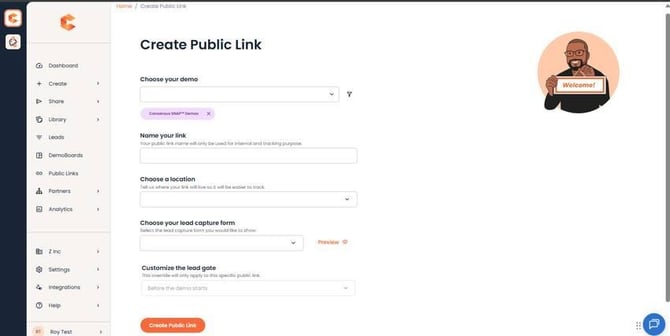 Create Public Link page — pick a demo, set the location to Website.
Recommended sizing
For desktop embeds, the recommended iframe size is 1440 × 900. Code:
<iframe src="Demo URL" width="1440" height="900" frameborder="0" allowfullscreen></iframe>
Replace `Demo URL` with the actual URL Consensus generated for the Public Link. The DemoPlayer's mobile breakpoint is 1024 px width — anything smaller than that switches to the mobile view. The minimum recommended size for desktop is 1280 × 800; the ideal is 1440 × 900.
Mobile note: for mobile traffic, prefer the direct Public Link over the iframe — the DemoPlayer renders full screen, which is a much better viewer experience than an iframe constrained inside your mobile page.
Hide the cookie banner
If you want to hide the DemoPlayer's cookie banner / icon on an embedded demo (often desirable when your own site already handles cookie consent), append `?hideCookieBanner=true` to the demo URL inside the iframe:
<iframe src="Demo URL?hideCookieBanner=true" width="1440" height="900" frameborder="0" allowfullscreen></iframe>
WordPress
If your site runs on WordPress, use the Consensus WordPress plugin instead of a manual iframe — it handles the embed cleanly and gives you a shortcode to drop into pages. See the dedicated WordPress integration article for setup.