
Get viewers to bring in other stakeholders
Consensus is built on the idea that B2B buying is a team sport — a single champion isn't enough. The platform gives you two complementary tools to push viewers to loop in their colleagues: the Share Prompt and the Invite Others CTA. Both are configured in Step 4 of the Demo Wizard.
When a viewer shares the DemoBoard with a new stakeholder, that stakeholder's engagement rolls up to the same organization in your Demolytics — so you can see the full buying group, not just your original recipient. The DemoBoard creator and any additional notifiers get email alerts when the new viewer starts watching.
Tool 1: the Share Prompt
The Share Prompt is an in-demo pop-up that nudges viewers to invite others mid-experience. You control where in the playback it appears — set it once on the demo and it triggers automatically on every DemoBoard built from that demo.
How to configure the Share Prompt
- In the left-hand sidebar, click Library, then choose Demos.
- Find the demo you want to edit and click the pencil icon to open the Demo Wizard.
- Jump to Step 4 (Stakeholder Actions).
- Pick a placement from the Share Prompt dropdown — or set it to Off to disable.
- Click Save & Exit.
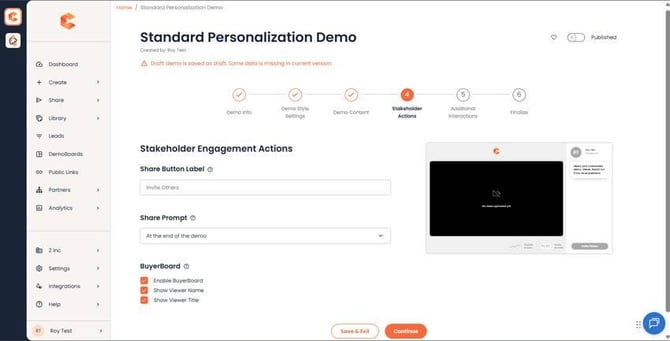 Step 4: Stakeholder Actions — Share Prompt placement dropdown.
Tool 2: the Invite Others CTA
The Invite Others CTA is a persistent button at the bottom of the DemoPlayer. It's on by default and we recommend keeping it on as your primary CTA on every sales demo — having a "loop in your team" button always visible is consistently one of the highest-leverage UX patterns in Consensus.
You can rename "Invite Others" to whatever fits your tone (see the "Editing the Share Demo / Invite Others CTA Button" article for the how-to). The CTA inherits its color from your Demo Style Settings (Step 2).
Tip — tell prospects directly
The strongest sharing signal is when you, the seller, explicitly ask. In the email or message that delivers the DemoBoard, include a one-liner like "feel free to share this with your team" or "this is a tool for your organization to evaluate together." That permission framing dramatically increases the share rate compared to relying on UI alone.