
Filter Demolytics for accurate reporting
Out of the box, Demolytics views automatically exclude two categories that usually skew the numbers: views from your internal email domains, and DemoBoards you've marked as Tests. This article covers how to set up both exclusions, and how to override them when you actually want to see the excluded data.
Step 1: configure internal email domains
Set up your internal domains so engagement from your own team doesn't pollute real-prospect numbers.
- Click Settings (gear) → Global Demo Settings.
- Scroll to the Demolytics & Account Settings section.
- Toggle Internal Domain DemoBoard Filtering ON.
- Add each internal domain (e.g. @goconsensus.com). Use the + icon to add multiple.
- Click Save at the bottom of the page.
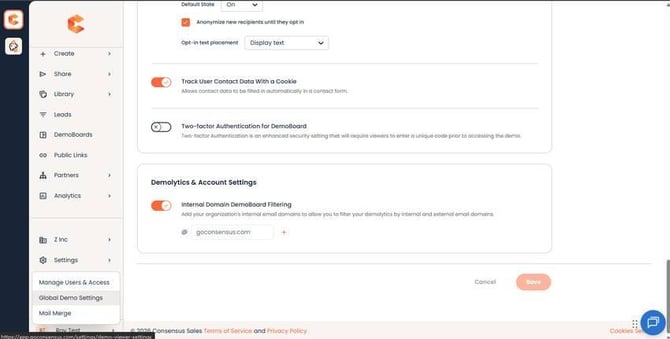 Demolytics & Account Settings — Internal Domain DemoBoard Filtering with the + button to add domains.
Step 2: mark testing DemoBoards as Test
During DemoBoard creation
- On the Create DemoBoard page, expand Additional Options.
- Toggle Mark as Test ON.
- Click Create DemoBoard. The board is flagged as a test and will be excluded from Demolytics by default.
For an existing DemoBoard
- Open Track DemoBoards.
- Hover the DemoBoard row, click the three-dots More Actions menu, and choose Additional Options.
- Toggle Mark as Test ON.
- Scroll down and click Save.
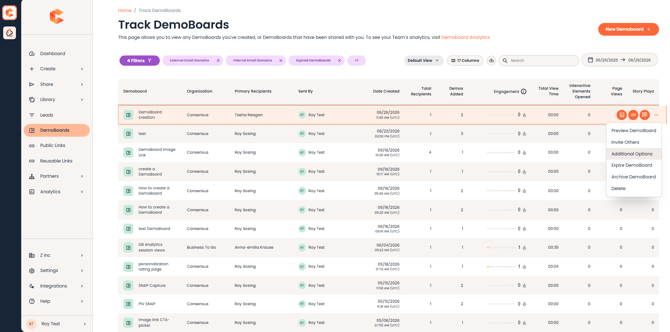 Track DemoBoards — three-dots More Actions menu with Additional Options for marking a DemoBoard as test after the fact.
Step 3: apply the filters in Demolytics
In Sales Demolytics (or any Demolytics view), click the filter icon next to the Apply button. The Additional Filters panel opens with three include/exclude checkboxes:
- External Email Domains — views from any domain not in your internal list. This is your "real prospects" data.
- Internal Email Domains — views from domains you've added to the internal list. Use to see your own team's testing activity.
- Test DemoBoards — DemoBoards marked as Test. Use to see testing-only data.
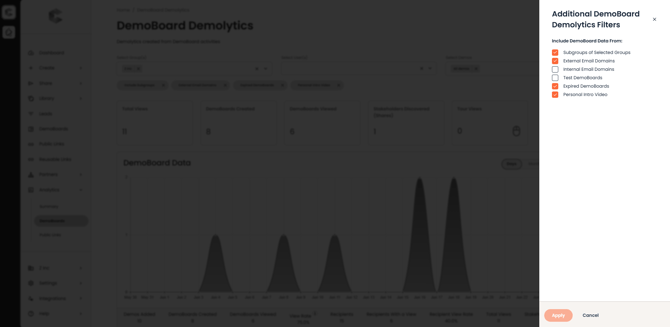 Additional Filters panel — three include/exclude checkboxes.
Recommended filter setup
For real sales-pipeline reporting, exclude both Internal Email Domains and Test DemoBoards. The view you get represents only views from real external prospects on real (non-test) DemoBoards.
How the filter math works
- Views from internal email domains do NOT count in Demolytics.
- Views from external email domains DO count.
- A DemoBoard counts in Demolytics if AT LEAST ONE recipient has an external email domain.
- A DemoBoard does NOT count if NONE of its recipients have an external email domain.
- Personal Intro Video (PIV) view time is always excluded from Demolytics.