
How to Copy a Demo in your Library
Duplicate a demo
Copy an existing demo to use as a starting point for a new one. Useful when you have a base demo that works and you want to spin off variants (different language, different audience, different use case) without reconfiguring everything from scratch.
Step-by-step
- Open Library → Demos.
- Find the demo you want to copy.
- Hover the row, click the three-dots More Actions menu.
- Choose Copy.
- Consensus creates a new demo with "Copy of..." prepended to the title. The new demo opens in the Demo Wizard ready for you to edit.
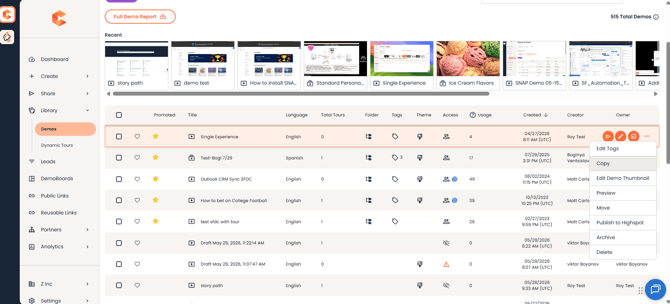 Demo Library — three-dots More Actions menu with the Copy option.
What gets copied vs. what doesn't
- Copied: demo content (videos, tours, documents), demo info (titles, description), Step 2 style settings, Step 4 stakeholder actions, Step 5 additional interactions, demo tags.
- NOT copied: DemoBoards or Public Links built from the original demo, Demo Access permissions (the new demo starts with just you as Owner), the Published state (the copy starts unpublished).
Permissions
You need Public Link Manager, Content Author, Content Manager, or higher to copy a demo. The copy is owned by you, regardless of who owned the original.