
How viewers invite others to a DemoBoard
One of the highest-leverage features in Consensus: when you enable the "Invite Others" CTA on a demo, viewers can pull in other stakeholders from their team without you doing any extra outreach. The new viewers show up in your Demolytics under the same organization, so you see the buying group expand in real time.
The viewer experience
When the Invite Others CTA is enabled, viewers see a persistent button at the bottom of the DemoPlayer. Clicking it opens a panel where they can enter the email addresses of the people they want to invite.
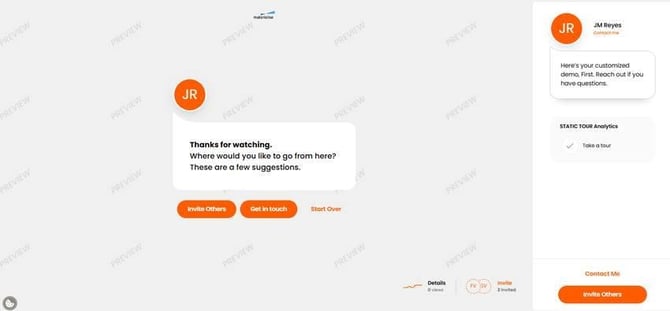 Invite Others CTA — what the viewer sees at the bottom of the DemoPlayer.
They can add multiple email addresses at once. Consensus sends each invitee an email with their own access link.
What happens with the new viewers
- They appear in the original DemoBoard's recipient list.
- Their engagement (views, feature ratings, watch time) is tracked separately but rolls up to the same organization in Demolytics.
- The DemoBoard creator and any notifiers get email alerts when each new viewer starts watching.
How to enable Invite Others
- On the demo: Demo Wizard → Step 4 (Stakeholder Actions). The "Invite Others" CTA is on by default.
- You can rename the button (e.g. "Loop in your team") in Step 4. See "Editing the Share Demo or Invite Others CTA Button."
- You can also nudge sharing with a Share Prompt — see "How to Encourage Sharing within a Demo."
Public Demo restriction
The Invite Others CTA only appears on DemoBoards (sales). On Public Links (marketing), the button is hidden — Public Demos don't have a recipient list to invite into.