
Until now, the buyer’s experience inside an automated demo has been a bit of a "black box." You could see where they paused or what they re-watched, but you couldn't know what they actually thought.
Buyer Reactions changes that by turning one-way automated demos into a two-way dialogue. This feature allows viewers to share their feedback in real-time, giving you the "why" behind the engagement data.
Feature Overview
Buyer Reactions provides a simple interface within the demo player for buyers to express interest, ask questions, or flag confusion.
- Three Reaction Types: ❤️ Love it, 💬 Comment (free-form text), and 👎 Dislike.
- Context-Aware: Every reaction is timestamped and tied to visual context, so you know exactly what the buyer was looking at when they reacted.
- Always On: This feature is automatically enabled for all customers across both Video Demos and Dynamic Tours.
Getting Started
There is no setup required. Buyer Reactions is enabled by default for every account.
- Send your demo: Share your demo via a DemoBoard or Public Link as you normally would.
- Buyer Interacts: The buyer will see the reaction bar inside the player. They can react at any moment or respond to the optional prompt at the end of the session.
- Review Feedback: Once a session ends, the DemoBoard sender or link owner receives a single summary email containing all reactions, comments, and timestamps.
How It Works
The Buyer Experience
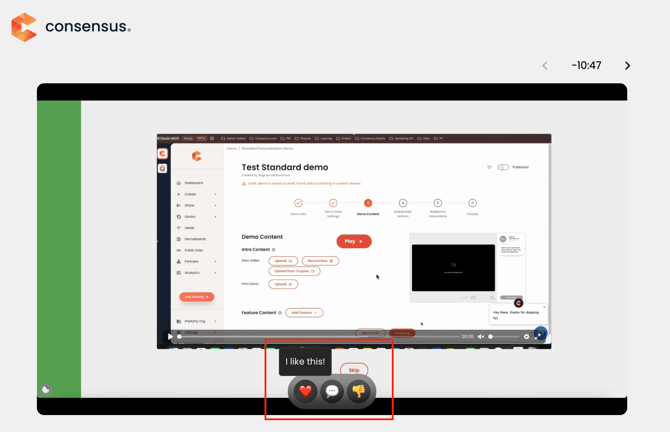
- Mid-Demo Feedback: Buyers can click a reaction icon at any point during playback.
- The Comment Flow: When a buyer selects the 💬 Comment icon, the video automatically pauses. This allows them to type their thoughts or questions without missing any content.
- End-of-Demo Prompt: After the demo concludes, an optional prompt appears asking for final thoughts. Buyers can provide a final reaction or simply skip and close the player.
The Seller Experience
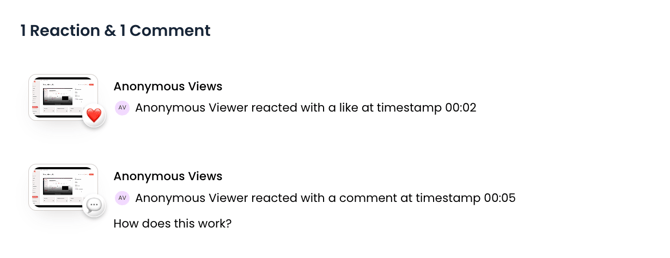
- Session Summary Emails: To prevent "notification fatigue," you won't get a ping for every single click. Instead, you'll receive one clean summary email at the end of the session.
- Heatmap Visualization: Within the session-level analytics, reactions are plotted directly onto the Heatmap. This ties the sentiment to the exact second it occurred.
- Aggregate Insights: View the DemoBoard or Public Link details page to see high-level trends, such as which demos are generating the most "Love it" reactions and which are sparking the most questions.
Best Practices
- Identify "Friction" Points: Use 👎 Dislike reactions to identify sections of your demo that might be confusing or irrelevant. If a specific slide consistently gets dislikes, it’s time for a content refresh.
- Personalize Your Follow-Up: Use the 💬 Comments to drive your next conversation. Instead of a generic "Checking in," you can say, "I saw your question about our API during the demo—here are the technical docs you're looking for."
- Spot High Intent: A ❤️ Love it reaction is a high-intent signal. Prioritize follow-ups for buyers who actively engage with the reaction bar.
FAQ
Which demo types support reactions?
Buyer Reactions is available for Video Demos and Dynamic Tours. Simulations are not supported at this time.
Do I get an email for every single reaction?
No. You will receive one summary email per session after the buyer finishes, consolidating all reactions and comments into one view.
Can buyers see what other buyers have said?
No. This is a private channel between the buyer and the seller. Reactions are never visible to other customers.
Does this cost extra?
No. Buyer Reactions is included for all customers as a core part of the platform.
What happens to the data if I export a report?
All reactions are captured as event types. They will flow through your existing analytics dashboards and will be included in CSV report exports.