
Ingest lead data into Consensus Public Link Lead Forms
For high-volume marketing programs, you typically don't want viewers to fill out a form when they're already known to your marketing automation platform. Consensus supports passing lead data into the Lead Form via URL parameters, so a viewer arriving from a marketing email or attributed ad lands on the demo with their info already filled in.
Where to configure
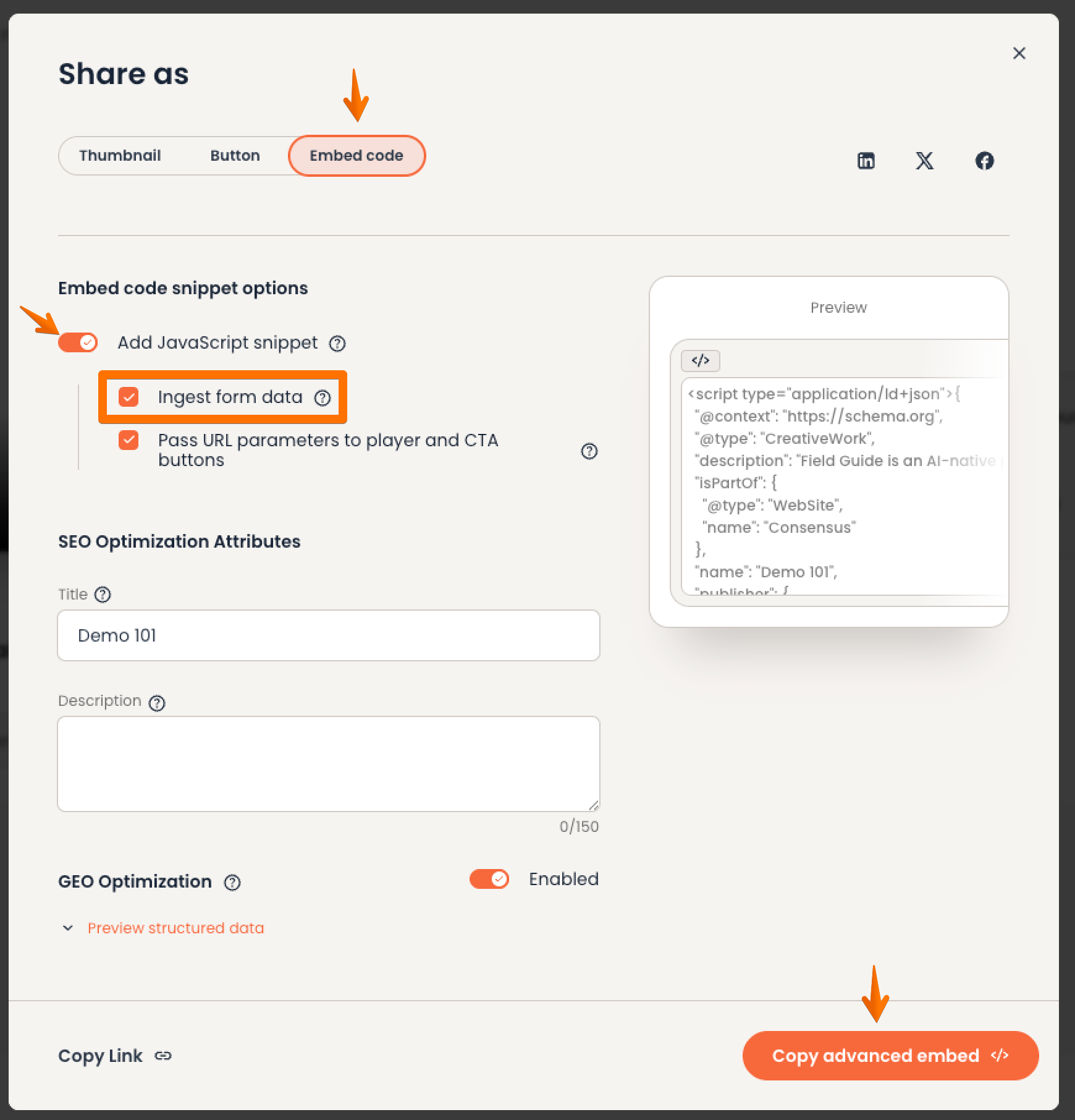
Share > Public Link > Create your Public Link > "Share as" modal would pop up > Embed Code > Enable "Add JavaScript Snippet" > Enable " Ingest form data > then finally Copy Advanced Embed
How it works
- For each Lead Form field you want to accept via URL parameter, define a parameter name (e.g. `email`, `first_name`, `company`).
- Your marketing automation platform appends those parameters to the Public Link URL when sending it to a known lead.
- When the viewer arrives at the Lead Form, the matching fields are pre-populated.
- The viewer either confirms the data and submits, or sees the fields pre-filled and proceeds to the demo (if Lead Gate placement is "after the demo").
Example URL
https://play.goconsensus.com/PUBLIC-LINK-ID?email=jane@acme.com&first_name=Jane&company=Acme
Best practices
- URL-encode parameter values (most marketing automation tools do this automatically).
- Only pre-fill data you trust — never pre-fill from untrusted sources or query strings that could be tampered with.
- Combine with Email Domain Restrictions (in Public Link Lead Forms settings) to block submissions from competitors / free email domains.
- Use UTM parameters in addition to lead data parameters — they flow into Demolytics for campaign attribution.
Privacy and compliance
Pre-filling lead data does not bypass viewer consent. The cookie banner and GDPR / CCPA opt-in flows still apply. The viewer can edit any pre-filled field before submitting.