
Pick the language for your DemoPlayer
The Consensus DemoPlayer supports 19 languages, set per-demo on Step 2 of the Demo Wizard. The language setting controls all default UI text — buttons, tooltips, system prompts. Anything you type yourself (feature titles, descriptions, CTA labels, the Share button) needs to be translated by you in each language version.
Supported languages
- English
- Chinese (Simplified)
- Chinese (Traditional)
- Czech
- Danish
- Dutch
- Finnish
- French
- German
- Indonesian
- Italian
- Japanese
- Korean
- Norwegian
- Polish
- Portuguese
- Russian
- Spanish
- Swedish
Where to set the language
Open the Demo Wizard on the demo you want to translate (Library → Demos → pencil icon) and jump to Step 2 (Demo Style Settings). The language dropdown is at the top of the page.
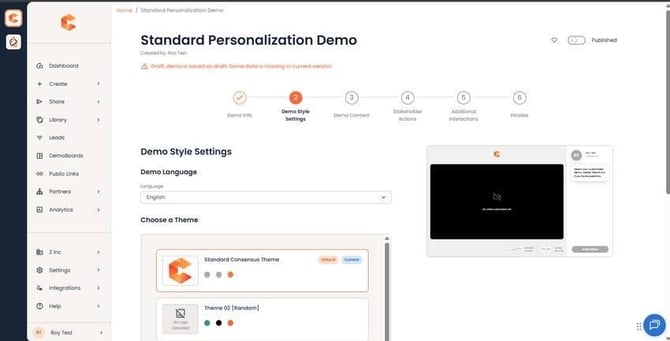 Step 2: Demo Style Settings — language dropdown at the top.
What the language setting changes
Once you change the language, the DemoPlayer's default text updates immediately across the entire viewer experience. Examples of what gets translated:
- Cover page text (welcome messaging, "Click to start" prompts).
- Share Prompt and Invite Others CTA text.
- Lead Capture Form labels and placeholders.
- System messages (loading, error states, expiration messages).
- Personalization rating prompts ("Very Important / Somewhat / Not Important" labels).
What you still need to translate yourself
Anything you typed during demo creation stays in whatever language you typed it. For each translated demo, plan to update:
- Internal Title and External Title (Step 1).
- Description (Step 1).
- Feature Titles and Descriptions (Step 3).
- CTA button labels (Step 5).
- Share Button label / Share Prompt copy (Step 4).
Tip — clone the demo for each language
For multi-language deployments, the cleanest pattern is to make a separate demo per language: clone your master demo (one copy per supported language), set Step 2 to that language, and then translate the typed-in text. This keeps analytics segmented per language and lets you measure which languages drive the most engagement.