
Recording a Personal Introduction Video (PIV) with Consensus Snap
SNAP enables you to create unique DemoBoard invitation links for prospects by using an existing Demo or recording a new Demo and Personal Introduction Video (PIV).
In this article, we will walk you through recording your PIV in SNAP.
- To record a PIV in SNAP, it is necessary to set up a DemoBoard first.
- Open the SNAP plugin in your browser to start your PIV recording.
- Click on the Create DemoBoard button.
- On the following page, you have the option to either select a Demo from the Demo Library list, Record a new Video, or Upload one that you've already created on your computer.
- Once the Demo has been selected click on the “Next” button.
- Fill in all the required fields to complete and proceed to the next step.
You can also add a recipient within SNAP
- On the next page, you have the option to: Use My Default Personal Intro Video; Create Custom Personal Intro Video; No Personal Intro Video
- To record your Personal Intro Video (PIV), choose Create Custom Personal Intro Video and click on Record Video to start recording.
- You'll be taken to the redesigned recording screen, where your camera and microphone are automatically selected based on your last session — you can switch either manually. You can also choose a background blur or virtual background here before you start.
- Once you click the record button, a countdown will begin at 3, 2, 1, so you have time to prepare.
- Once recording, you can Pause at any point without losing your progress, then Resume to continue — your final PIV will include both segments seamlessly stitched together.
- Once you have completed your PIV, click on finish.
- SNAP has the ability to edit the video you have created. Click on the Done Editing button if you have finalized your video.
- After linking your PIV to your Demoboard, click the Next button at the bottom right corner of SNAP.
- On this Additional Options page, you can set up: Notifications & Access; toggle On/Off Show User's Contact Info; toggle On/Off two-factor Authentication; toggle On/Off No-View Notifications; toggle On/Off Expiration by Days; toggle On/Off Mark as Test
- Once you have set up your preferred options, click the Create Demoboard button at the bottom right corner of SNAP.
- This is the final step to complete your Personalized Introduction Video (PIV) along with your DemoBoard.
- You can copy the Link or the Thumbnail to your email and send it out.
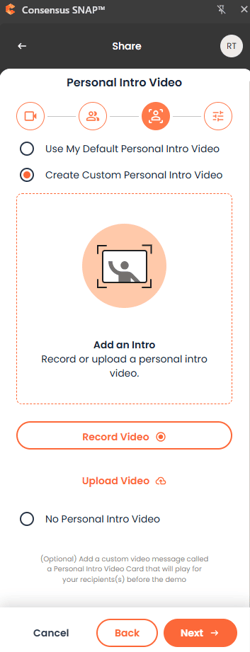
Snap recording window — start a Personal Introduction Video recording.
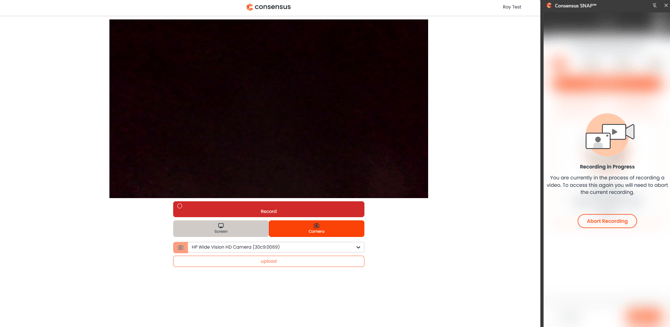
Snap record modal — choose camera/screen capture.