
Three ways to send Consensus content to others
Consensus gives you three patterns for getting your demo content in front of prospects, depending on the context.
1. DemoBoard — for known prospects
Generate a unique URL for a specific prospect or organization. The DemoBoard is branded for them, viewers can self-identify on the Who Are You page, and Demolytics tracks each viewer individually.
- Click Share → DemoBoard.
- Pick demos, add recipients, configure options, click Create.
- Copy the link and send via email, chat, LinkedIn, etc.
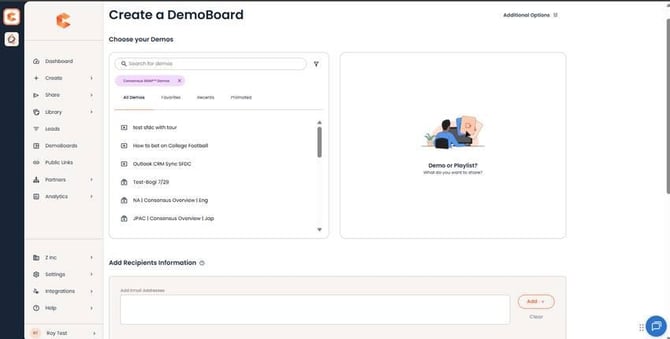
DemoBoard creation — for known prospects.
2. Public Link — for marketing / top of funnel
Generate a single URL that anyone can hit. Includes a Lead Capture Form that gates demo access — that's how Consensus identifies the viewer.
- Click Share → Public Link.
- Pick a demo, configure location and lead form.
- Click Create. Use the Link, Embed Code, or Thumbnail to share.
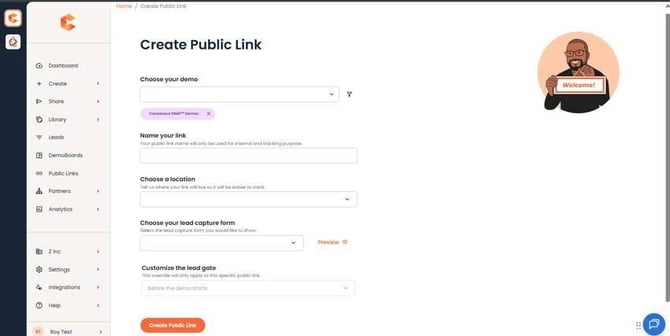
Public Link creation — for top-of-funnel awareness and lead generation.
3. Mail Merge — for outbound campaigns
For high-volume outreach (BDR sequences, marketing campaigns), use the Mail Merge integration. It generates a unique DemoBoard for each recipient automatically — same per-prospect tracking as a manual DemoBoard, but at scale.
-
Click Settings → Mail Merge
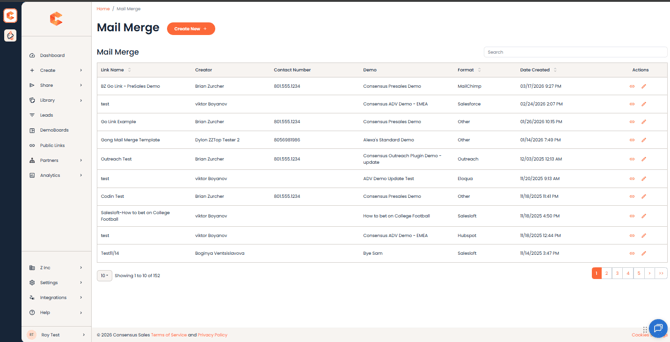
Mail Merge Creation - On the top, click on the 'Create New' button
See the Mail Merge Demo Link article for setup details. Mail Merge integ-rates with Outreach, Salesloft, Gmail, and Outlook.
Sharing once a viewer has access
Within a DemoBoard, viewers can also pass the demo to colleagues using the "Invite Others" CTA — Consensus tracks the new viewer's engagement under the same organization. This is how a single DemoBoard naturally expands across a buying group.