
Let viewers share your demos to social media
You can enable a social-media share icon on every DemoBoard so viewers can post the demo link to LinkedIn, Facebook, or X (Twitter). When viewers share via social, the demo reaches their network — useful for top-of-funnel awareness and for letting champions amplify your story to their professional circle.
How to enable
Click Settings → Global Demo Settings → Demo Viewer Settings tab. In the Sharing section, toggle Sharing Through Social Media ON. Click Save.
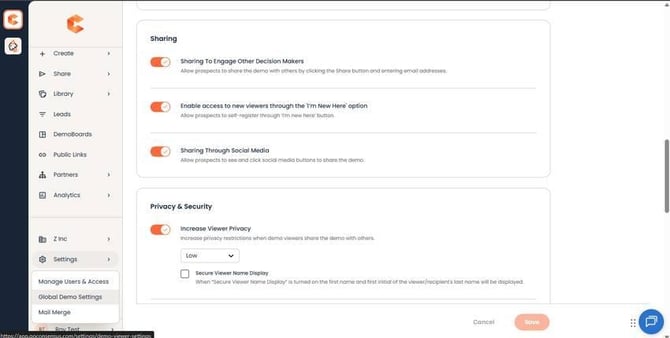 Demo Viewer Settings → Sharing section — Sharing Through Social Media toggle.
When enabled, every DemoBoard shows a share icon on the cover page. Viewers click the icon, pick LinkedIn / Facebook / X, and post — the platform pre-fills the share text with a link back to the DemoBoard.
Tracking
Visits that come in via social share are tracked in the same DemoBoard analytics — the prospect just appears as a new viewer in the same organization record (assuming they identify themselves on the Who Are You page).