
Sharing to Engage Other Decision Makers setting
B2B buying decisions are made by groups, not individuals. The Sharing to Engage Other Decision Makers setting lets your prospects pull additional stakeholders into the DemoBoard — multiplying your reach inside the buyer org without you doing extra outreach.
Best practice: keep this setting ON at all times. Cases where you might turn it off are rare (very strict NDAs, specific compliance requirements). For everything else, the Invite Others CTA that this setting enables is one of the highest-leverage features in Consensus.
Where to find it
Settings → Global Demo Settings → Demo Viewer Settings tab → Sharing section → Sharing to Engage Other Decision Makers toggle.
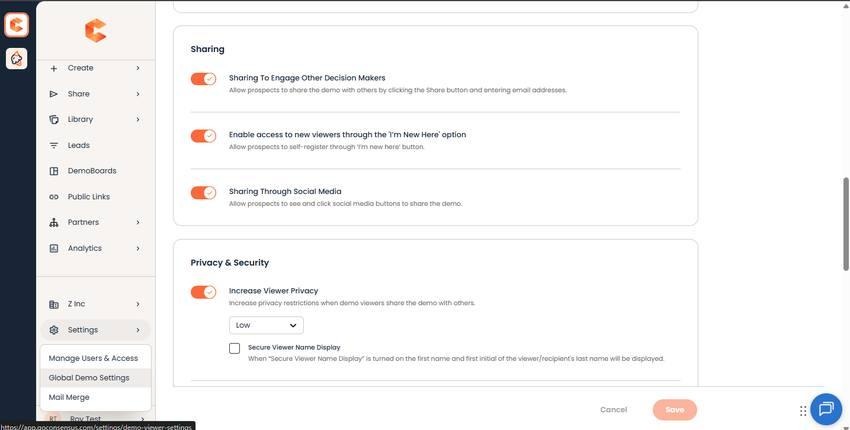
Demo Viewer Settings → Sharing section — Sharing to Engage Other Decision Makers toggle (always on by default).
What enabling it does
- Adds the "Invite Others" CTA to the bottom of every DemoBoard — viewers click to add a colleague.
- Adds an Invite Others option to the DemoBoard Share Prompt (if Share Prompt is enabled on the demo).
- New viewers added via Invite Others appear in the same organization's Demolytics, so you see the buying group expand in real time.
See also
"DemoBoard Viewer Privacy and 'I'm New Here'" for the related I'm New Here setting (which controls whether brand-new viewers can register on the Who Are You page). "How to Encourage Sharing within a Demo" for tactics to drive more shares.