
In B2B sales we often talk about "the buyer," but the buying group is rarely one person. Our 2026 Sales Engineering Compensation & Workload Report found that the average deal involves four unique stakeholders, and that buyers open shared content an average of five days after it's sent. Think about your own purchases at work: how many colleagues had to understand the details and benefits before you could move forward? Whatever the exact number, getting every one of those people the information they need is one of the biggest factors in whether a deal moves.
This article explains who typically makes up a buying group, how Consensus shows you what each stakeholder cares about, and a framework for helping your champion bring everyone else along.
| Who's in the buying group |
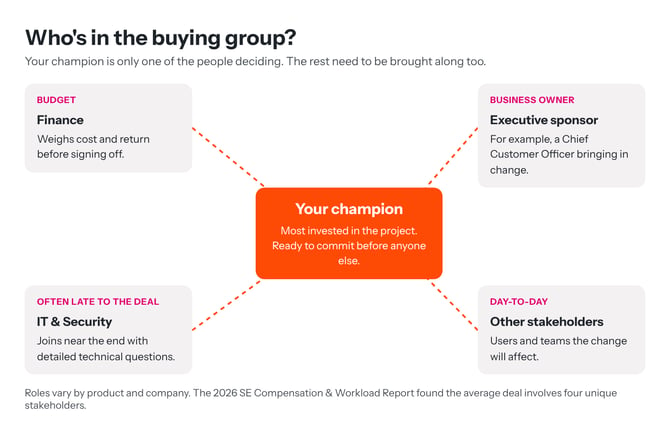
Start with your champion: usually the person most invested in the project, and the one saying "this is going to work." But they aren't deciding alone. Depending on your product, the group may include a Finance Manager weighing the cost, or an executive such as a Chief Customer Officer who is driving the change.
By the time your champion is ready to commit, the rest of the group often isn't. If they feel left behind, they can slow the project down or stop it altogether, so bringing them on board matters as much as winning over the champion.
Don't forget IT and Security. These teams often join near the end of the decision and arrive with detailed technical questions. Preparing for them early avoids a late stall.
| See what each stakeholder cares about |
When you send a demo with Consensus, you can see who has viewed it and what each person said matters to them. As each viewer personalizes the demo, they rate the topics as Very Important, Somewhat Important, or Not Important for what they need to learn that day. Those ratings appear for each recipient in Track DemoBoards:
- Green dot — Very Important. This is great discovery you didn't have to ask for.
- Yellow dot — Somewhat Important.
- Red dot — Not Important for this viewer right now.
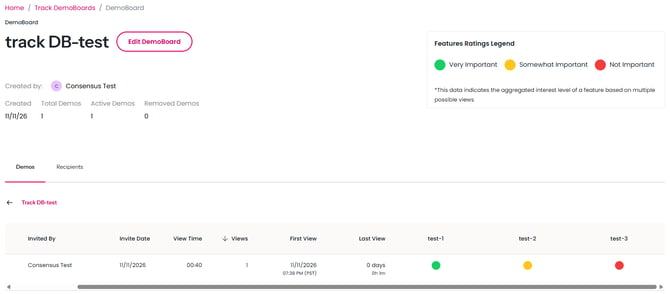 Track DemoBoards showing a viewer's feature ratings as green, yellow, and red dots, with the Feature ratings Legend
See Basics of Track DemoBoards for how to find this view.
| See how each stakeholder watched |
For each stakeholder who views your demo, whether early in their buying journey or near the end, you also get a heatmap. Open the viewer's details from Track DemoBoards and select the Heatmaps & Reactions tab. The features are grouped by how that viewer rated them, and each feature video has a bar showing which parts they watched, with the percentage watched at the end.
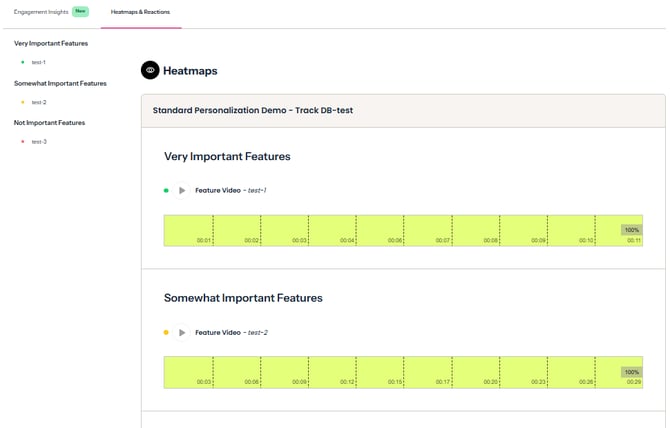
Heatmaps and reactions tab showing a viewer's features grouped by importance, with a watch bar and percentage watched for each feature video
If a viewer watched one feature all the way through, or came back to it, ask them about it on your next call. It's great that they spent time learning more, so find out what caught their interest. See Interpreting the Viewing Details / Heatmaps.
| Tip: The Engagement Insights tab, which opens first on the same page, can generate a short AI summary of each viewer's session, including topics of interest and anything to watch out for. It's available when AI features are enabled for your organization. See Engagement Insights. |
| Help your champion bring everyone along |
How do you help stakeholders move themselves through their buying journey? Not by asking "which sales stage are you at now?" They're in buying stages, not sales stages: it's a buying motion.
We recommend the DEEP-C framework, which we've found especially helpful for enabling the champion. It's a coaching methodology that covers discovering who the champion and the other stakeholders are, helping the champion engage those stakeholders, equipping them with what they need, and personalizing the information for each person. You'll find it in Garin Hess's book Selling is Hard. Buying is Harder., or learn more on our website.
Bringing more stakeholders in pays off. In the 2026 report, stakeholders who were discovered and looped into a shared demo engaged at a 61% rate, compared with 28% for the primary recipient, and viewed the demo an average of 88 hours sooner. DemoBoards with 7 or more stakeholders were tied to deals 36% of the time, compared with 19% for DemoBoards with no additional stakeholders.
Consensus gives your champion the tools to widen that circle themselves:
- BuyerBoard — share the same engagement insight you see with your champion, so they can see who has viewed, what each person cares about, and who still needs to watch. See What is the BuyerBoard?
- Inviting others — viewers can invite colleagues straight to the DemoBoard, so new stakeholders join the conversation with the same content. See How Viewers Invite Others to the DemoBoard.
| Keep Exploring |
Basics of Track DemoBoards · Interpreting the Viewing Details / Heatmaps · What is the BuyerBoard? · Engagement Insights