
Every piece of content you share from Consensus — a DemoBoard, a Public Link, or a Dynamic Tour — has its own unique link. This article explains how each URL is structured, which identifier makes it unique, and how to tell the link types apart.
DemoBoards and Public Links
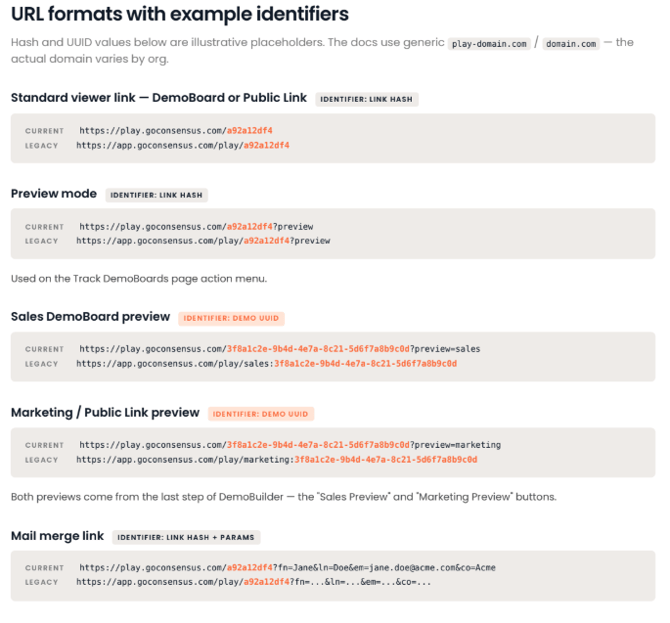
DemoBoards (created on the Create DemoBoard page) and Public Links (created on the Get Public Link page) share the same viewer URL format:
https://play-domain.com/{hash}
The {hash} is the unique identifier for that specific link. Every DemoBoard and every Public Link gets its own hash — even if they're built from the same demo. Older links may use the legacy format https://domain.com/play/{hash}; these continue to work.
Tip: Because DemoBoards and Public Links share the same viewer URL format, you can't tell them apart from the URL alone. Where the link was created (Create DemoBoard vs. Get Public Link) determines the link type and where its analytics appear in Demolytics.
Preview links
Preview links use the demo's UUID instead of the link hash, and the preview type is explicit in the URL:
| Preview type | URL format |
|---|---|
| Sales DemoBoard preview | https://play-domain.com/{demoUuid}?preview=sales |
| Public Link (marketing) preview | https://play-domain.com/{demoUuid}?preview=marketing |
You'll find these on the last step of DemoBuilder — the Sales Preview and Marketing Preview buttons. A general ?preview version of the standard link is also available from the Track DemoBoards page.
Mail merge links
Mail merge links use the standard link hash plus personalization parameters that fill in the recipient's details:
https://play-domain.com/{hash}?fn=Jane&ln=Doe&em=jane.doe@acme.com&co=AcmeDynamic Tours
Dynamic Tours
Dynamic Tours live in your Consensus Library under Library > Dynamic Tours, and each tour's ID appears in the ID column of the library table. Tours are shared in two ways:
Go Links — for general sharing
https://reachsuite.app/go/{experienceId} Example: https://reachsuite.app/go/exp-9440635f

A Go Link is easy to identify: if the URL contains /go/, it's a Go Link. To copy one, click the ⋯ menu on the tour and select Copy URL (in the Consensus Dynamic Tours library) or Copy experience URL (in ReachSuite).
Important: Always share the Go Link — not a copy-paste from your browser's address bar. Each time someone opens a Go Link, a new unique session is created, which is what powers accurate tour analytics.
Smart Links — for per-recipient tracking
Smart Links are unique tracking links generated per deal or recipient. Click the link icon on the experience tile in the ReachSuite Portal, enter the recipient's email address, and click Create. Each Smart Link is its own unique URL, and viewing activity appears in the Smart Link Tracking Experience analytics tab — and on the contact's activity timeline if a CRM integration is connected.
HTML tours
Tours built with HTML Capture display with a distinct icon in the Dynamic Tours Library and open for viewing and editing on a dedicated link that is different from standard Dynamic Tour links.
Quick reference
| Link type | Unique identifier | URL pattern |
|---|---|---|
| DemoBoard (viewer) | Link hash | play-domain.com/{hash} |
| Public Link (viewer) | Link hash | play-domain.com/{hash} |
| Sales preview | Demo UUID | play-domain.com/{demoUuid}?preview=sales |
| Marketing preview | Demo UUID | play-domain.com/{demoUuid}?preview=marketing |
| Mail merge link | Link hash + params | play-domain.com/{hash}?fn=…&ln=…&em=…&co=… |
| Dynamic Tour (Go Link) | Experience ID | reachsuite.app/go/exp-… |
| Dynamic Tour (Smart Link) | Unique tracked link | Generated per recipient in ReachSuite |
| HTML tour | Dedicated link | Differs from standard tours (see above) |