
Add your privacy policy (and other links) to every demo
The Global Demo Footer is a band of text and links that appears at the bottom of every demo in your account. It's the right place for your Privacy Policy link, copyright notice, contact info, or any other legal / support content that should be on every demo regardless of the rep or campaign.
Configure the Global Demo Footer
- Click Settings → Global Demo Settings.
- Switch to the Global Demo Footer tab.
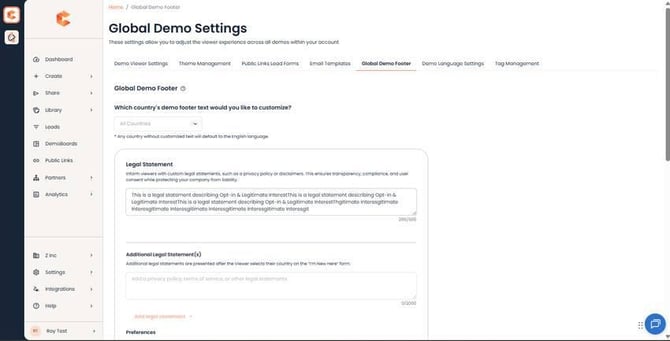 Global Demo Footer tab (top) — Footer content fields and Privacy Policy link.
Available controls
- Privacy Policy URL — paste your Privacy Policy link. Most teams use this; many regulators (GDPR, CCPA) effectively require it.
- Copyright text — typically "© 2026 Your Company Name. All rights reserved."
- Custom links / external URLs — anything else you want to surface (e.g. Support, Terms of Service).
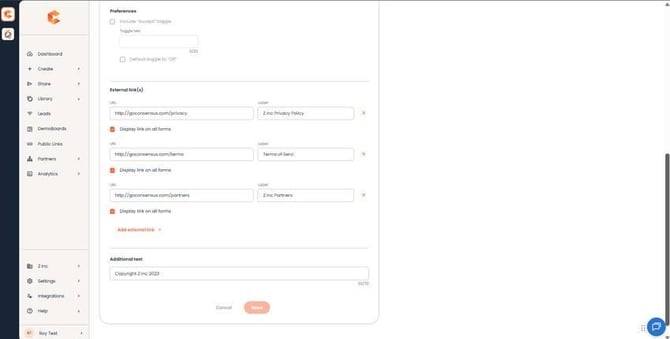 Global Demo Footer (bottom) — toggles for Contact Form / Who Are You page display, plus the live preview.
Display toggles
Two toggles at the bottom of the Global Demo Footer tab control where the footer shows:
- Display on Contact Form pages.
- Display on the Who Are You page.
The footer always shows on the main DemoPlayer; these toggles only affect the auxiliary pages.
Preview before saving
The Global Demo Footer tab includes a live preview pane so you can see exactly how the footer renders on a demo. After saving, also open one of your existing demos in preview mode to confirm the layout looks right end-to-end.
Heads up: the Global Demo Footer applies to every demo in your account — including ones already created. Changes go live immediately, so double-check before saving.