
A DemoBoard is a branded, prospect-specific landing page generated by Consensus for a specific organization or recipient. Each DemoBoard has its own unique URL and its own Demolytics, so when you send the same demo to ten different companies, you get ten separate DemoBoards — each one tracking exactly who engaged, when, with which features, and for how long.
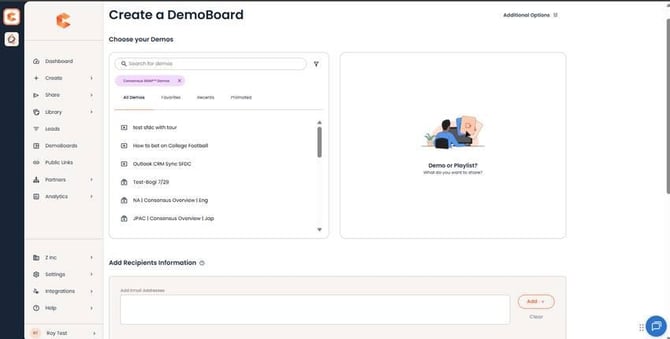 Create DemoBoard page — pick demos and add recipient info to generate a personalized DemoBoard.
Creating a DemoBoard in Consensus Web app
What goes into a DemoBoard
When a Sales Rep creates a DemoBoard, they fill in:
- Organization — the prospect's company name. Auto-filled from the recipient's email domain when possible.
- Recipient first/last name and email — one or many; each recipient gets their own activity tracked separately.
- Recipient title (optional) — useful for stakeholder-level analytics and follow-up.
- Demo selection — pick one or more demos to include in the DemoBoard playlist.
Everything you fill in shows up on the DemoBoard cover page when the recipient opens it — they see their name, their organization, and the playlist of demos curated for them.
Anatomy of a DemoBoard
When the recipient lands on the DemoBoard, here's what they see:
- Cover page — branded with your logo and the recipient's organization. Optionally includes a Personal Intro Video from the rep who sent it.
- Feature videos — for Standard Demos, the per-feature segments the viewer rates and chooses between.
- Video player — the main playback area with full DemoPlayer functionality (transcripts, pause, scrub, captions when available).
- Document bar — any related documents the demo creator attached (PDFs, slides, etc.).
- CTA buttons — up to four customizable CTAs the demo creator configured, plus the "Invite Others" button on every DemoBoard.
- Global Demo Footer — account-wide footer set by admins. Common uses: privacy policy link, copyright notice, support contact info.
DemoBoard vs. Public Link
DemoBoards are personalized and tied to specific recipients. Public Links are the opposite — one URL anyone can hit, used for top-of-funnel marketing demos. Use a DemoBoard when you have a known prospect; use a Public Link when you're casting wider (website embed, social ads, mass email).
How to create a DemoBoard
See "Create a DemoBoard within Consensus" for the full step-by-step.