
Consensus includes two default roles for sales reps: Sender/Tracker and Sender/Tracker SNAP Creator. Both let reps send and track DemoBoards, but only one lets them create their own video demos. This article explains the difference so you can choose the right role for each rep.
| What both roles can do |
Reps with either role can:
- Create and send DemoBoards from existing demos, in the web app and in Snap.
- Track the DemoBoards they've sent.
- Create Mail Merge Links.
- Use Consensus Snap.
| Where the two roles differ |
The difference comes down to creating content:
- Sender/Tracker — can preview demos in the library and share them, but can't create, edit or copy demos. Their Create menu offers only DemoBoard, and in Snap this role shares existing demos only.
- Sender/Tracker SNAP Creator — can do everything a Sender/Tracker can, plus create and copy demos. In the web app, the Create menu adds Single Experience demos, the Screen Recorder and ScreenPal, and the ⋯ menu on a library demo includes Copy. This role can also create Dynamic Tours, HTML Tours and Sandbox Tours. In Snap, this role can record a new video or upload one, then edit the demos they've created.
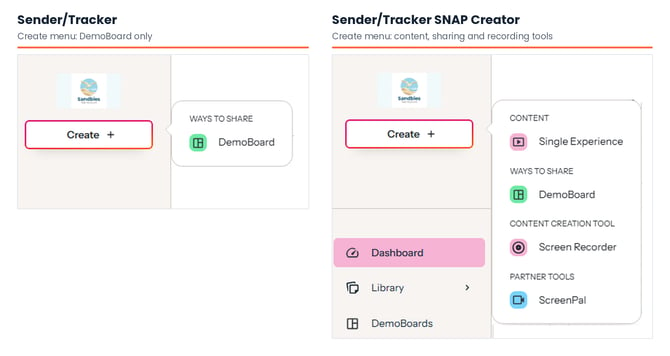 Sender/Tracker (DemoBoard only) vs Sender/Tracker SNAP Creator (Single Experience, DemoBoard, Screen Recorder, ScreenPal)
| Which role should you assign? |
If your team encourages reps to record their own personalized videos, assign Sender/Tracker SNAP Creator. If you'd rather keep every demo your prospects receive centrally created and approved, Sender/Tracker is the better fit. You can mix both across your team, and adjust a rep's role at any time.
To change a user's role, an admin can update it in the web app's user management. For more granular control, you can also build a custom role. See Roles & Permissions - Custom Roles.
| Frequently Asked Questions |
Can a Sender/Tracker record or upload a video in Snap? No. For a Sender/Tracker, the Record Video button and the upload icon don't appear at the top of the Snap panel. Recording and uploading require the Sender/Tracker SNAP Creator role or a custom role with demo creation.
Can a Sender/Tracker create demos in the web app? No. Their Create menu offers only DemoBoard, under Ways to Share.
Can a SNAP Creator copy a teammate's demo? Yes. Open the ⋯ menu on the demo in your library and choose Copy. The copy is yours to edit.
Can a SNAP Creator edit demos made by someone else? No. They can edit only the Single Video Demos they've created.
| Keep Exploring |
Roles & Permissions - Custom Roles · How to Add, Edit, or Enable/Disable Users in the Platform · Recording a Personalized Video with Consensus Snap