
Attach related documents to your demos
Beyond the videos themselves, every Consensus demo can carry related documents — datasheets, case studies, pricing sheets, security overviews, anything you'd normally email separately. Documents show up in the DemoPlayer's document bar and stay accessible to the viewer throughout the experience.
Which demo types support documents
- Single Experience Demos — one set of documents that show throughout the demo.
- Standard Personalization Demos — two layers: Intro Docs (always shown) and Feature Docs (shown only for features the viewer rated as Somewhat or Very Important).
Discovery Demos handle documents differently — see How to Create Discovery Demos for the specifics.
How to add documents
- In the left-hand sidebar, click Library, then choose Demos.
- Find the demo you want to update and click the pencil icon to open the Demo Wizard.
- Jump to Step 3 (Demo Content). Documents live in this step.
Single Experience Demos — Related Docs
For Single Experience Demos, related documents are added in the Related Docs section directly below the video upload. Click Upload, pick your file, and the document appears in the section. Add as many as you need — there's no document count limit.
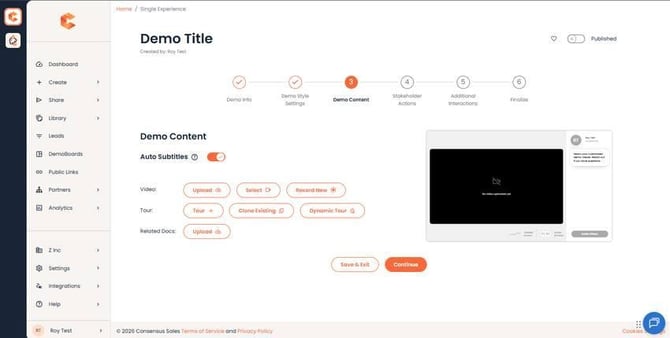 Single Experience Demo Step 3 — Related Docs section under the video upload.
Related docs on a Single Experience Demo show up at the bottom of the DemoPlayer for the duration of the entire demo.
Standard Personalization Demos — Intro Docs
For Standard Demos, the equivalent of "always show" documents are called Intro Docs. They're added under the Intro Video section. Intro Docs show throughout the entire demo — viewer ratings don't affect whether they're visible.
Standard Personalization Demos — Feature Docs
Feature Docs are attached per-feature within the Feature Content list. They only appear after the personalization stage, and only for features the viewer rated as Somewhat Important or Very Important. Use this when you have a feature-specific datasheet you don't want surfacing for viewers who don't care about that feature.
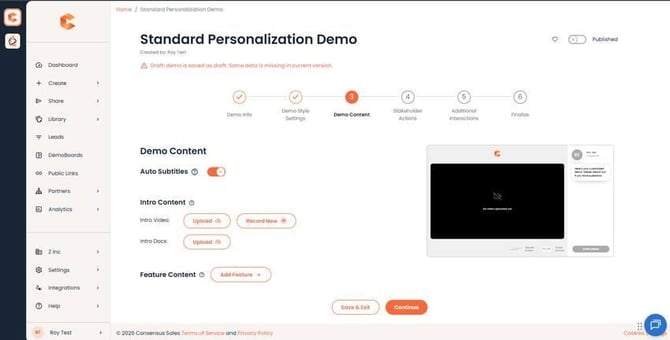 Standard Demo Step 3 — Intro Docs at the top, plus Feature Docs attached per feature.
Supported document types
- PDF (with PDF thumbnail preview in the document bar)
- Microsoft Word (.doc / .docx)
- Microsoft PowerPoint (.ppt / .pptx)
- Microsoft Excel (.xls / .xlsx)
- Microsoft Publisher
Save your changes
Click Save & Exit when you're done. The demo and every existing DemoBoard or Public Link built from it picks up the new documents automatically.