
Sending a personalized demo via DemoBoard
In Consensus, the way you send a personalized demo to a prospect is by creating a DemoBoard. A DemoBoard is a unique landing page generated for one specific prospect or organization — branded for them, with their name on the cover page, and tracked separately in Demolytics from every other DemoBoard.
How to create a DemoBoard in Consensus Web app
Step-by-step
- Click Share → DemoBoard in the left sidebar.
- Pick a demo (or build a playlist of multiple demos).
- Add recipient emails. Consensus auto-fills Organization and Names from the email domain when possible.
- Configure Additional Options (Notifiers, expiration, two-factor auth, etc.) as needed.
- Click Create DemoBoard. Consensus generates a unique URL.
- Copy the link as Image, Button, or Text format and paste into your email or message to the prospect.
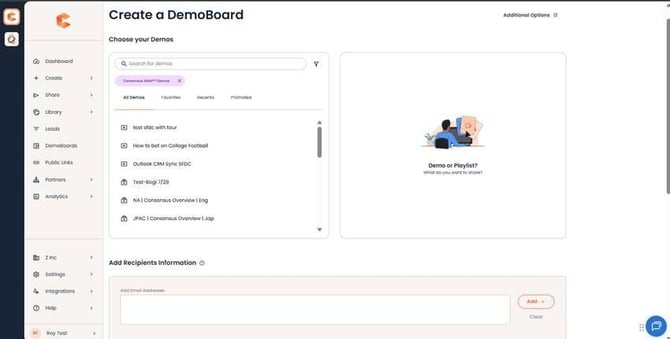 Create DemoBoard — pick demos and add recipient info.
For full details
See "Create a DemoBoard within Consensus" for the complete walkthrough, including playlist limits, personalization fields, and CTA picker. See "What is a DemoBoard?" for an in-depth explanation of what makes up a DemoBoard.