
Pick the right CTA for your demo
Every Consensus demo can include up to four Call-to-Action buttons in the DemoPlayer. Don't leave the next step to chance — viewers don't always know what to do after watching. A clear CTA bridges the gap between "watched the demo" and "took an action."
CTA options to consider
- Schedule a meeting / Book a call — links to your calendar tool (Calendly, Chili Piper, etc.). Best for sales-cycle demos where the next step is a conversation.
- Try it free / Start a trial — links to your sign-up flow. Works well for product-led demos at the top of the funnel.
- Visit website / Learn more — links to a product page, pricing page, or feature deep-dive. Useful for awareness-stage demos.
- Download / Get the guide — links to a whitepaper, datasheet, or related resource. Useful for lead-nurture demos.
- Contact sales — links to a Lead Capture Form or a sales contact page. Works for enterprise demos where the buying motion is high-touch.
Best practices
- One primary CTA, two or three secondary at most. Too many options creates choice paralysis.
- Match the CTA to the demo's funnel stage — a top-of-funnel demo needs a different CTA than one sent during late-stage evaluation.
- Use action-oriented verbs. "Schedule a 15-min walkthrough" beats "Contact us." "Get the integration guide" beats "Learn more."
- For B2B sales: the "Invite Others" CTA on DemoBoards (always on by default) is often your highest-leverage CTA — it multiplies the demo across the buying group.
Where to configure CTAs
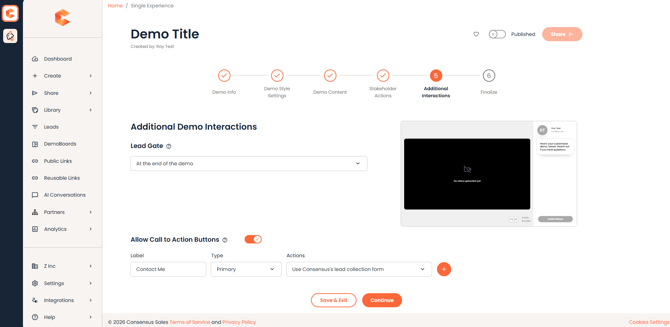
CTAs are configured on Step 5 (Additional Interactions) of the Demo Wizard.
Showing and hiding CTA buttons
The "Allow Call to Action Buttons" toggle in Step 5 (Additional Interactions) controls whether CTAs appear in the DemoPlayer. Toggle off, and no buttons display.
Use the toggle — not the button style — to control visibility. Primary and Secondary set how a button looks, not whether it shows.
See "How to Create a Standard Demo" for the full Demo Wizard walkthrough.
NOTE: Need a specific Public Link to show different CTAs than the demo's default? You can override CTAs at the link level without changing the demo itself. See "Where do I get the Public link for my website?" for the steps.