
Get a Public Link for your demo
Public Links let you embed any published demo on your website as a top-of-funnel lead capture tool. Viewers fill out the lead form before watching, and their info lands in your Leads dashboard automatically.
Step-by-step
- In the left sidebar, click Public Links → Create Public Link.
- Pick a demo from the dropdown.
- Configure location, lead capture form, and customize-the-lead options as needed.
- Click Create. Consensus generates the link plus an embed code.
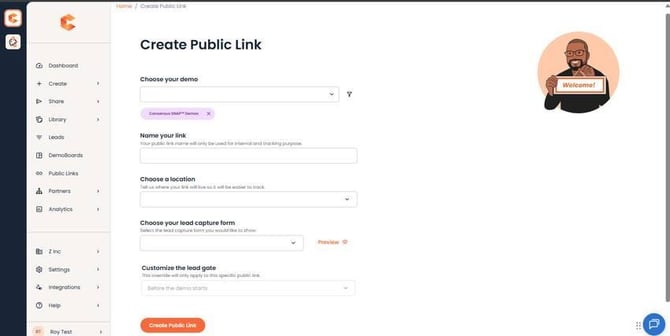 Create Public Link page.
Embed it on your website (iframe)
<iframe src="Your Demo URL" width="1120" height="680" frameborder="0" allowfullscreen></iframe>
Replace `Your Demo URL` with the URL Consensus generates. The recommended iframe size is 1440 × 900 for desktop; the mobile breakpoint is 1024 px width.
Mobile note: for mobile traffic, prefer the direct Public Link over the iframe — the DemoPlayer renders full screen, which is a much better viewer experience.
For the full Public Link walkthrough see "Where do I get the Public link for my website?" For the dedicated iframe embedding guide see "How to Embed a Demo on your Website using an iFrame."