
Who can see tours, who can build them, and what plan you need — all in one place. If you’re an admin setting up your team, this is the article to bookmark.
The Short Version
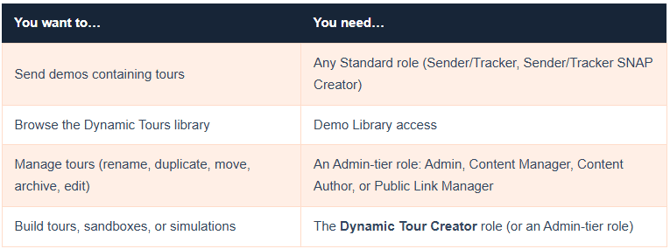
|
Licensing: What Comes With What
Dynamic Tours (Screen and HTML) require the Tours plan. Sandbox Tours are included with Tours and Simulations licenses at no additional cost. Full Simulations require a simulation package. Not sure what your account has? Your Consensus account team can confirm — and upgrade you if needed.
Logging In: One Account, Everything Connected
There’s no separate tours login. Sign in to Consensus as you always do, then head to Library > Dynamic Tours — you’re automatically authenticated under one unified login. The same credentials carry into the Chrome extension when you build (see the capture guide).
Longtime ReachSuite users: the old reachsuite.io login and bookmarked login pages are retired. Everything runs through your Consensus account now — one link, everything inside.
Dynamic Tours Consensus sign-in
Roles, In a Little More Detail
Standard users (Sender/Tracker, Sender/Tracker SNAP Creator) can browse the library and send demos containing tours — but not manage or create tour content. That’s by design, so your content stays consistent.
Admin-tier users (Admin, Content Manager, Content Author, Public Link Manager) get full library management: rename, duplicate, move, archive, and edit.
Dynamic Tour Creator is a supporting role — added alongside a user’s system role, not replacing it. It unlocks tour creation, including the capture extension. Setting up custom roles? The Dynamic Tour Creator permission must be explicitly added to custom roles — it isn’t inherited automatically. If a builder on a custom role can’t create, this is almost always why.
Troubleshooting
You can’t see the Dynamic Tours section at all. Work down this list: (1) Plan — no Tours plan, no tours; check with your CSM. (2) Demo Library access — users limited to “My Demos” won’t see the tours library; if they only need to send tour content, build the tour into a demo and place that demo where they can send it. (3) Creating, not just viewing? Confirm the Dynamic Tour Creator role — and on custom roles, that the permission was explicitly added.
The extension is grayed out. The extension activates through your Consensus session — see the activation section of the capture guide.
FAQ
Who can create tours? Anyone with the Dynamic Tour Creator role (or an Admin-tier role). Your Consensus administrator can grant it.
Do I need a separate login for tours? No. One Consensus login covers the app, the library, and the capture extension.
My content creator is on a custom role and can’t build tours. Why? The Dynamic Tour Creator permission must be explicitly added to custom roles — it isn’t inherited. That’s the culprit in almost every case.
Can my Sender/Tracker users share tours? Yes — through demos. Build the tour into a demo, place it where they can send it, and they’re set.
Related Articles
Getting Started with Consensus Tours · Capturing Tours with the Chrome Extension · Managing Your Tours Library