
Consensus gives you four ways to let buyers experience your product hands-on. They share one capture extension and one goal — buyers exploring your product on their terms — but each is built for a different job. This guide helps you pick the right one, then points you to the walkthrough for building it.
| Setup: Install, Pin, Sign In — and Check It’s Active |
Install the Consensus Dynamic Tour + Simulation Builder from the Chrome Web Store, pin it to your toolbar, and sign in by clicking the icon and selecting Sign in — it authenticates with your Consensus credentials, no separate account. Then check that it’s active: the icon shows orange when active, gray when off. If it’s gray, open the Consensus web app and enter the tours area first — the extension activates through your Consensus session.
| The Four Experience Types |
Dynamic Tour (Screen) — A guided, click-through walkthrough captured as a recording of your live application. You script the journey; buyers follow your path with callouts and optional AI narration guiding each step. Best for: telling a specific story — a feature spotlight, an onboarding flow, a “here’s the wow moment” walkthrough.
Dynamic Tour (HTML) — A guided walkthrough captured with HTML rendering, so every page keeps the real look and feel of your web app: fully scrollable, with authentic hover states. Still a scripted, single path — just richer to the touch. Best for: guided stories where buyers benefit from interacting with real page elements along the way.
Sandbox Tour — A free-form, multi-path environment built from HTML captures stitched together. Unlike the two guided types above, the viewer clicks in any direction the screen offers — you set the boundaries, they drive. Best for: live discovery demos where the conversation steers the clicks, buyer-led exploration, and lightweight POC replacements. Record once, then use AI to re-theme the underlying data for any vertical, persona, or language.
Full Simulation — The fourth experience type, and a different animal from the three tours above: a deep, fully integrated replica of your application with real backend behavior, not captured screens. One important difference in how it reaches buyers: Simulations can’t currently be added to demos — they function as standalone experiences you share on their own. Best for: power users who need true product behavior.
| Quick Decision Guide |
-
Want to script the journey? → Dynamic Tour (Screen or HTML — HTML if scroll and hover realism matter).
-
Want the buyer (or your AE on a live call) to drive freely? → Sandbox Tour.
-
Need real backend behavior? → Full Simulation (a standalone experience, shared on its own — Simulations can’t currently be added to demos).
-
Not sure? Most teams run guided Dynamic Tours for outbound and self-serve stories, and Sandbox Tours for live discovery and hands-on exploration — with full Simulations reserved for advanced use cases.
| Where Everything Lives |
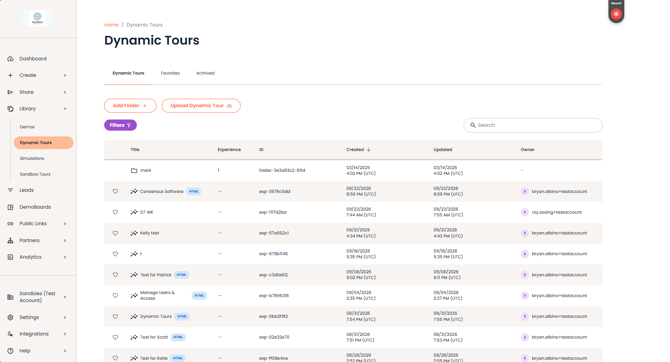
Dynamic Tours (Screen and HTML) live in Library > Dynamic Tours in the Consensus app — HTML tours are marked with an HTML badge.
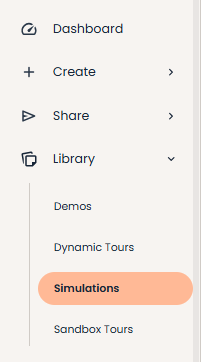
Sandbox Tours and Simulations each have their own section in the Consensus Library
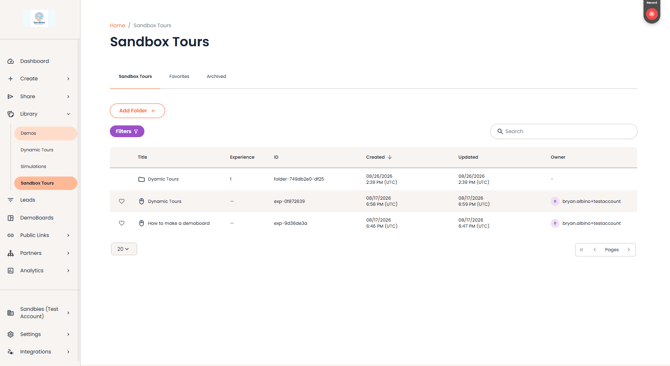
Library > Sandbox Tours page
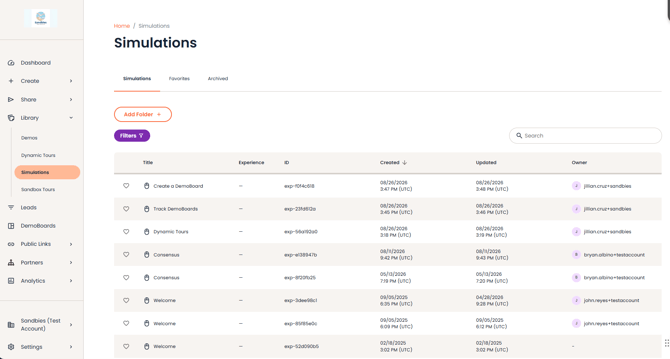
Library > Simulations page
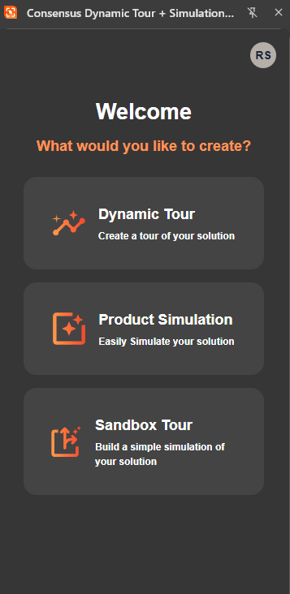
Creating any of them happens through the Consensus Dynamic Tour + Simulation Builder Chrome extension.
| Your Path to a First Tour |
Five stops, each with its own guide:
-
Confirm your access and role in Tours Access, Login & Permissions.
-
Install the extension and capture your first experience with Capturing Tours with the Chrome Extension.
-
Polish it in Editing Tours.
-
Organize it in Managing Your Tours Library.
-
Share it and read the signals with Adding Tours to Demos & Sharing and Tour Analytics.
| Key Terms, In Plain Language |
-
Callouts — the guided prompts walking viewers through each step (write them yourself or refine AI first drafts).
-
Click targets — the highlighted elements viewers click to advance.
-
Guides & guardrails — the highlights that lead viewers to the point, and the constraints that keep them from getting lost.
-
Discovery Flow — in-tour questions that capture buyer intent.
-
Auto-Update — re-captures a Dynamic Tour’s click path automatically when your product UI changes (available for Dynamic Tours only).
-
Smart Link — a tracking link tying a tour session to a specific viewer.
-
Demolytics — where tour engagement shows up alongside the rest of your demo analytics.
| FAQ |
I’m brand new — which type should I build first? A Dynamic Tour. It’s the fastest path from “I have a product” to “my buyers are exploring it,” and everything you learn carries over to the other types.
Do all four experience types use the same extension? Yes — tours and Simulations alike are built with one extension, one login. You choose the experience type when you start a capture.
Do I need a separate license for each type? No separate license per type: Dynamic Tours come with the Tours plan, and Sandbox Tours are included with Tours and Simulations licenses at no extra cost. Full Simulations require a simulation package. Details in Tours Access, Login & Permissions.
What happened to ReachSuite? It became part of Consensus. Tours now live in your Consensus Library under one login, and the extension was renamed. Everything you built carried over.
Can a buyer tell the difference between an HTML capture and my live app? Captured pages preserve the real look and feel — fully scrollable, with authentic hover states — so the experience feels like your product, in a controlled environment.
| Related Articles |
Tours Access, Login & Permissions · Capturing Tours with the Chrome Extension · Sandbox Tours · Tour Analytics