
Customize the look of your demos
Demo Style Settings let you brand every demo to match your company's language, logos, brand colors, and contact info. These settings are configured on Step 2 of the Demo Wizard for every demo type (Standard, Single Experience, Discovery).
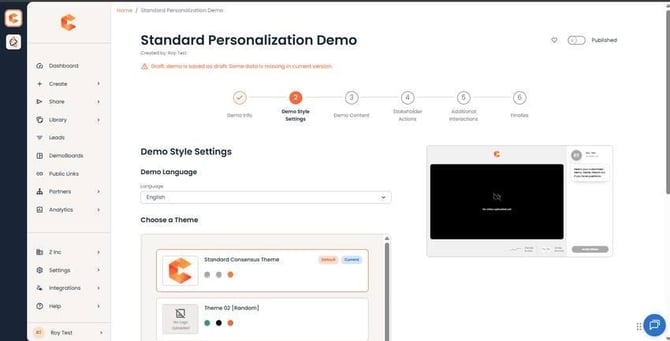
Step 2 — language, theme, logos, and color scheme.
Theme
Set your demo to use the New Default Theme. The legacy Flat and Transparent themes were retired in February 2023 and are no longer available.
Language
Pick from 19 supported languages: English, Chinese (Simplified and Traditional), Czech, Danish, Dutch, Finnish, French, German, Indonesian, Italian, Japanese, Korean, Norwegian, Polish, Portuguese, Russian, Spanish, and Swedish.
The language setting controls only the DemoPlayer's default UI text. Anything you type into the demo yourself — Feature Titles, Descriptions, CTA button labels, the Share Demo button — must be translated by you in each language version.
Contact Info
The Contact Info section sets a general phone number, email, and links to company social media that appear in the DemoPlayer footer. Best practice: keep this generic — don't use a single rep's personal contact information if other reps will use the same demo. Per-rep contact info is attached separately at the DemoBoard level.
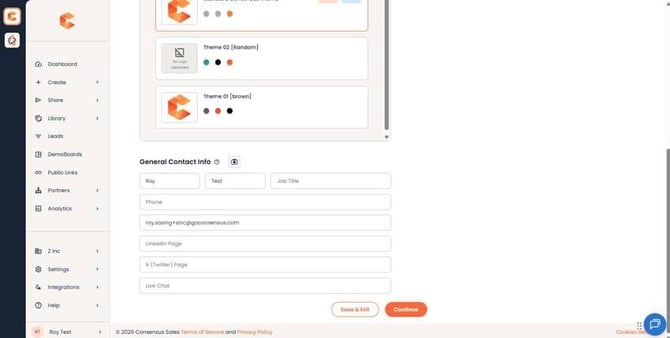
Contact Info section — company-level phone, email, and social links.
Logo placement preview
You upload four logos that appear in different parts of the demo experience.
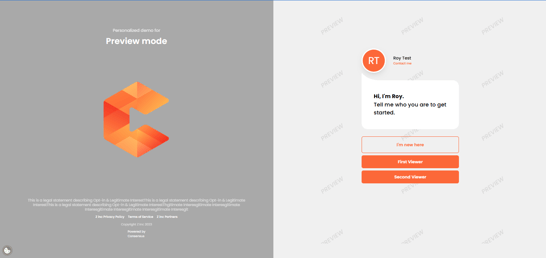
- Cover Logo — appears when the viewer first opens the demo (cover page).
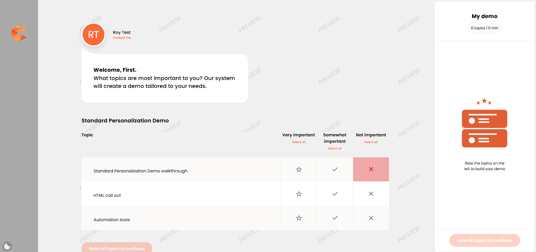
- Sidebar Logo — appears during the Intro Video and while the viewer is selecting feature topics.
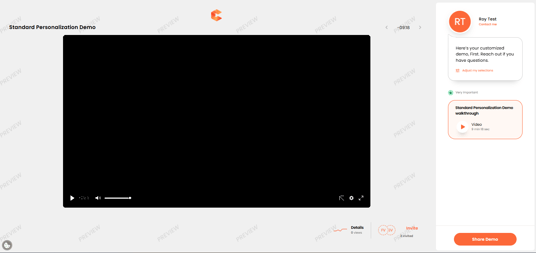
- Player Logo — appears while the viewer is watching feature videos.

- Favicon — appears on the viewer's browser tab.
Logos are dynamic and based on aspect ratios — there's no fixed pixel size. If you upload a logo larger than the recommended dimensions, it scales down. If you upload one that's too small, it may pixelate when scaled up. Use the largest crisp version of your logo and let Consensus handle the resizing.